# Redux
# 纯函数
- 不可变的输入产生不可变的输出
- 函数执行过程不产生副作用
# Redux 基础
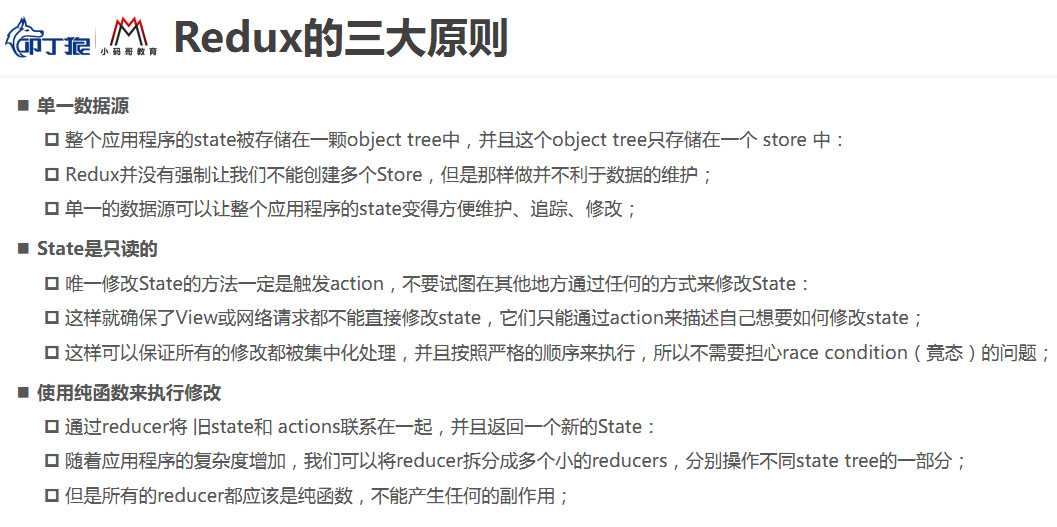
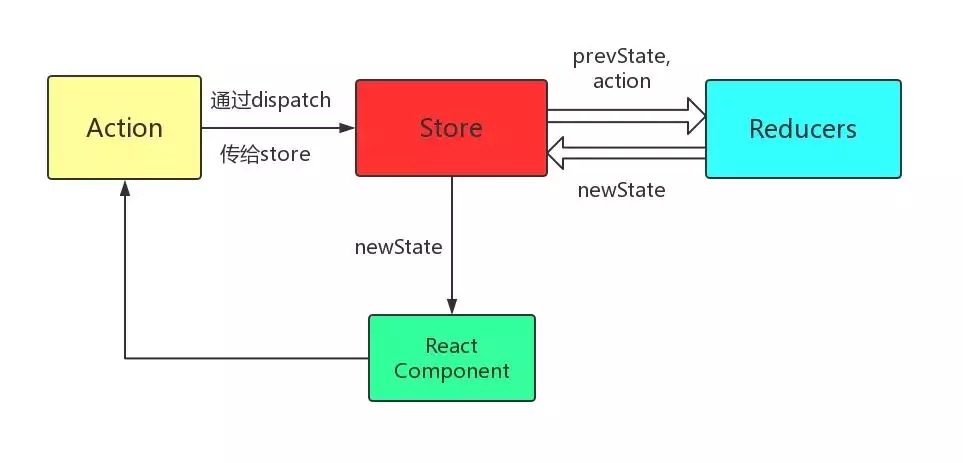
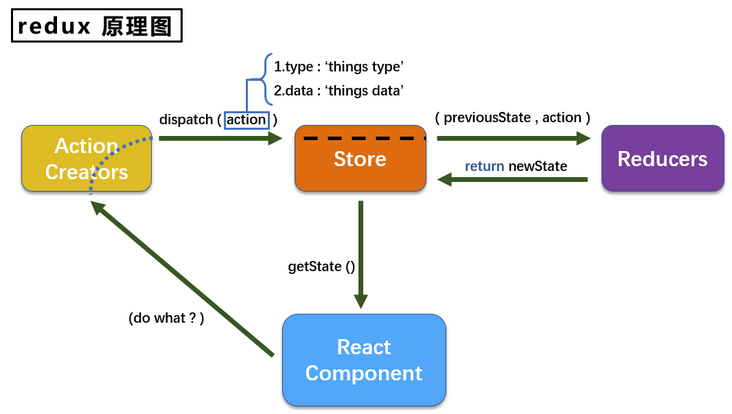
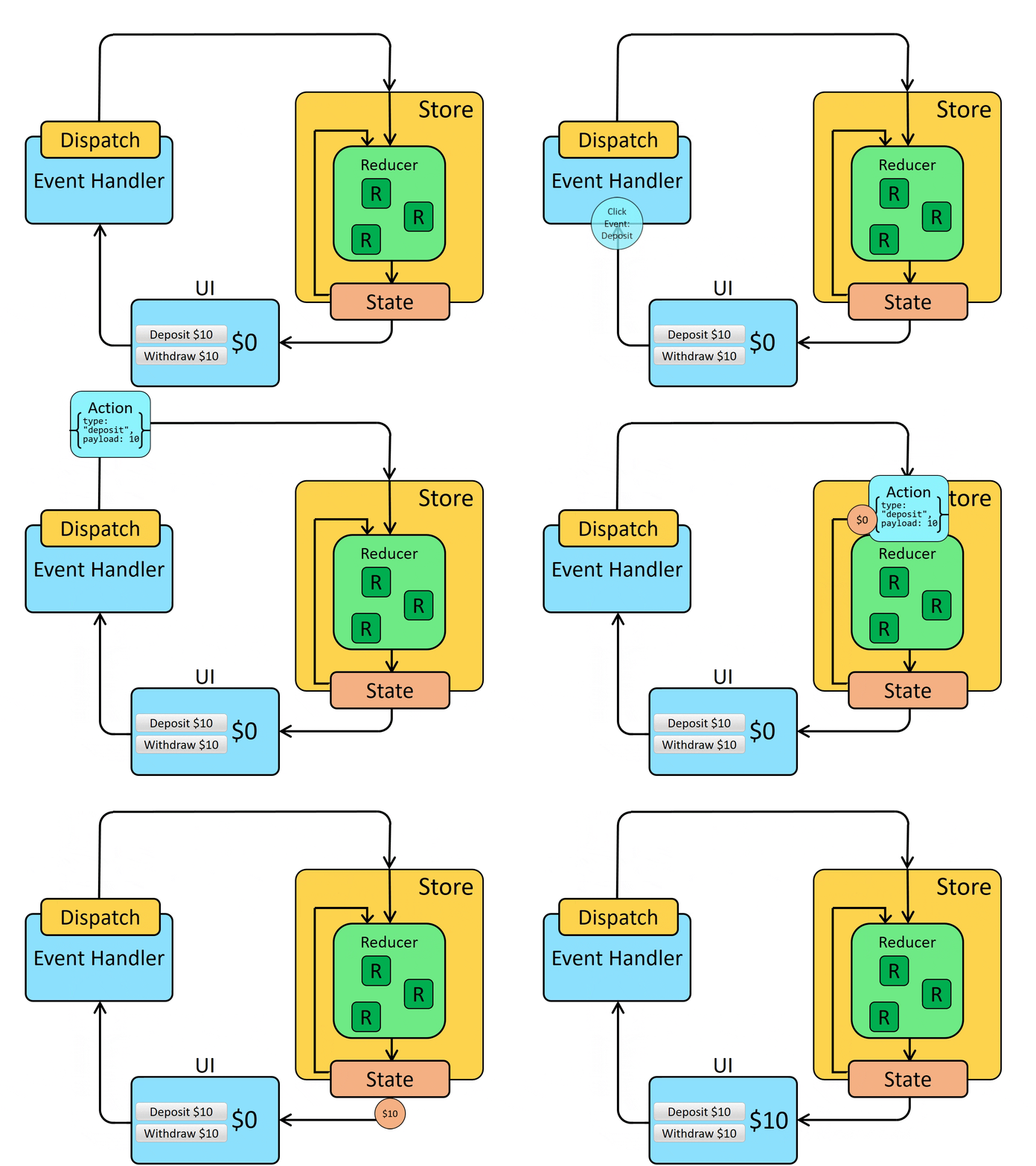
Redux 是一个使用 “ action ” 事件来管理和更新应用状态的模式和工具库。
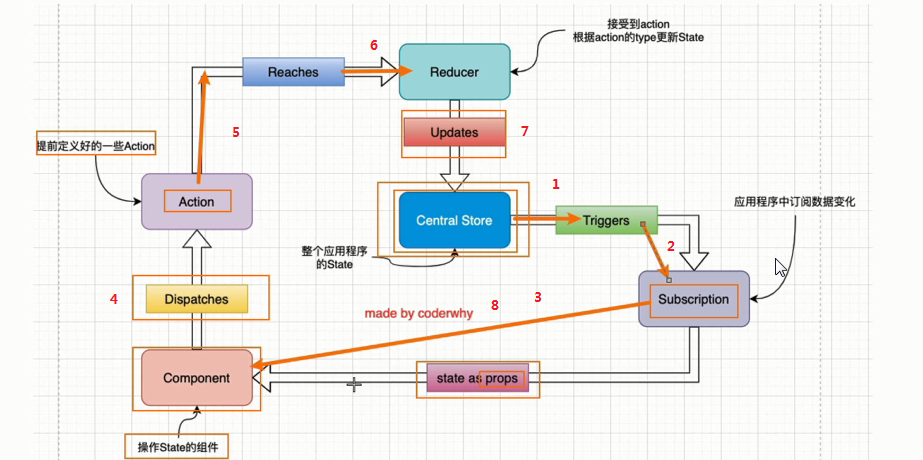
store 单一数据源,存储所有的 state
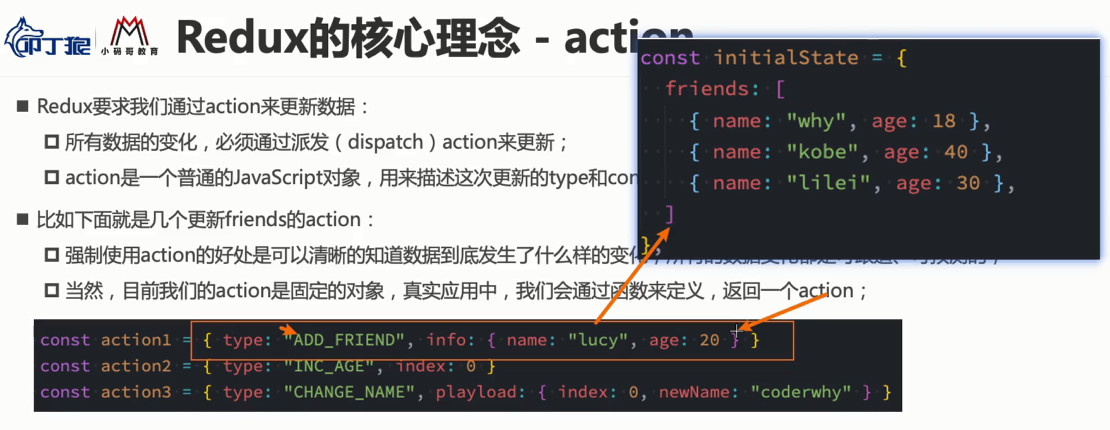
action 所有数据的变化, 必须通过 dispatch 派发 action 来更新,
定义数据更新的 type 和所需的 content ,使数据可追踪、可预测
action 是一个普通的 JavaScript 对象
reducer 将原来的 state 和 action 结合起来生成一个新的 state
reducer 是纯函数而且必须都是纯函数
不可以直接更改原来的 state,而是按不可变原则复制一份 state
nvm 启动 node 并创建练习项目
nvm use 12.22.0
npx create-react-app learn-redux
2
安装 redux
yarn add redux
yarn start
2
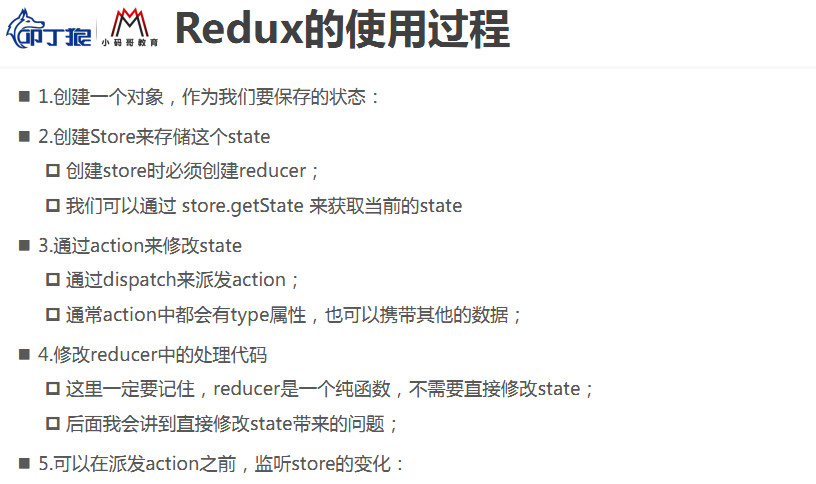
initialState 食物
store 装食物的容器
store.subscribe 温度/功率监控面板
store.dispatch 启动电磁炉按钮
action 功能设置按钮:是否添加其它食材,选择发生哪种变化,例如: 蒸煮炒煎煲
reducer 电磁炉
// 在 node 中的写法
const redux = require("redux");
// 真实开发中使用以下写法
// import {createStore} from "redux";

const initialState = {
  counter: 0
}

// 创建 reducer
function reducer(state = initialState, actions) {
  switch (actions.type) {
    case "INCREMENT":
      // 用户自定义属性可以覆盖扩展运算符内部的同名属性
      return {...state, counter: state.counter + 1}
      break;
    case "DECREMENT":
     return {...state, counter: state.counter - 1}
     break;
    case "ADD_NUMBER":
     return {...state, counter: state.counter + actions.number}
     break;
    default:
      return state
      break;
  }
}

// 根据 reducer 创建 store
// 在 node 中的写法
const store = redux.createStore(reducer);
// 真实开发中使用以下写法
// const store = createStore(reducer);

// 订阅监听 store 的 state 变化
store.subscribe(() => {
  console.log("counter 按顺序变化:", store.getState().counter);
})
// counter 按顺序变化: 1
// counter 按顺序变化: 0
// counter 按顺序变化: 5

const action1 = {
  type: "INCREMENT"
}

const action2 = {
  type: "DECREMENT"
}

const action3 = {
  type: "ADD_NUMBER",
  number: 5
}

// 修改 store 中的 state
store.dispatch(action1);
store.dispatch(action2);
store.dispatch(action3);
2
3
4
5
6
7
8
9
10
11
12
13
14
15
16
17
18
19
20
21
22
23
24
25
26
27
28
29
30
31
32
33
34
35
36
37
38
39
40
41
42
43
44
45
46
47
48
49
50
51
52
53
54
55
56
57
58
59
# Redux 拆分
目录结构
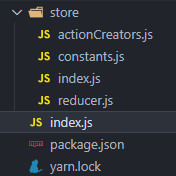
index.js
import store from './store/index.js';

import {addAction, subAction, incAction, decAction} from './store/actionCreators.js';

// 订阅获取并打印最新的 state
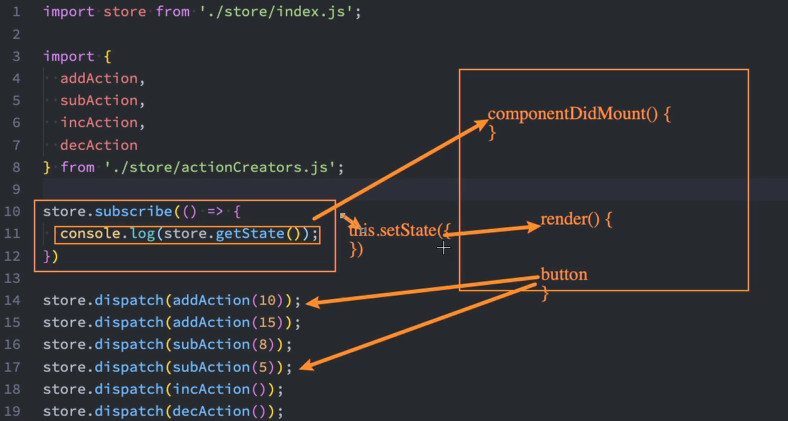
store.subscribe(() => {
  console.log(store.getState());
})

store.dispatch(addAction(10)); // { counter: 10 }
store.dispatch(addAction(15)); // { counter: 25 }
store.dispatch(subAction(8));  // { counter: 17 }
store.dispatch(subAction(5));  // { counter: 12 }
store.dispatch(incAction());   // { counter: 13 }
store.dispatch(decAction());   // { counter: 12 }
2
3
4
5
6
7
8
9
10
11
12
13
14
15
store/constants.js
export const ADD_NUMBER = "ADD_NUMBER";
export const SUB_NUMBER = "SUB_NUMBER";
export const INCREMENT = "INCREMENT";
export const DECREMENT = "DECREMENT";
2
3
4
store/actionCreators.js
import {ADD_NUMBER, SUB_NUMBER, INCREMENT, DECREMENT} from './constants.js';

export const addAction = num => ({
  type: ADD_NUMBER,
  num
});

export const subAction = num => ({
  type: SUB_NUMBER,
  num
});

export const incAction = () => ({
  type: INCREMENT
});

export const decAction = () => ({
  type: DECREMENT
});
2
3
4
5
6
7
8
9
10
11
12
13
14
15
16
17
18
19
store/reducer.js
import {ADD_NUMBER, SUB_NUMBER, INCREMENT, DECREMENT} from './constants.js';

const defaultState = {
  counter: 0
}

// reducer 处理 action,返回新 state
function reducer(state = defaultState, action) {
  switch (action.type) {
    case ADD_NUMBER:
      return { ...state, counter: state.counter + action.num };
    case SUB_NUMBER:
      return { ...state, counter: state.counter - action.num };
    case INCREMENT:
      return { ...state, counter: state.counter + 1 };
    case DECREMENT:
      return { ...state, counter: state.counter - 1 };
    default:
      return state;
  }
}

export default reducer;
2
3
4
5
6
7
8
9
10
11
12
13
14
15
16
17
18
19
20
21
22
23
store/index.js
// 在 node 中的写法
import redux from 'redux';
// 真实开发中使用以下写法
// import {createStore} from "redux";

import reducer from './reducer.js';

// 在 node 中的写法,action 通过 dispatch 传给 reducer
const store = redux.createStore(reducer);
// 真实开发中使用以下写法
// const store = createStore(reducer);

export default store;
2
3
4
5
6
7
8
9
10
11
12
13
# React 中使用 Redux
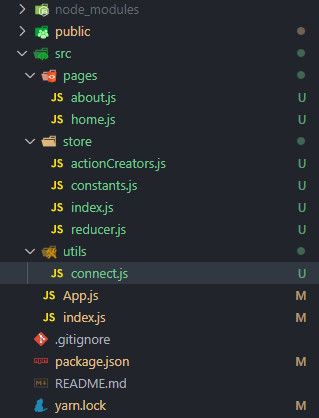
目录结构:
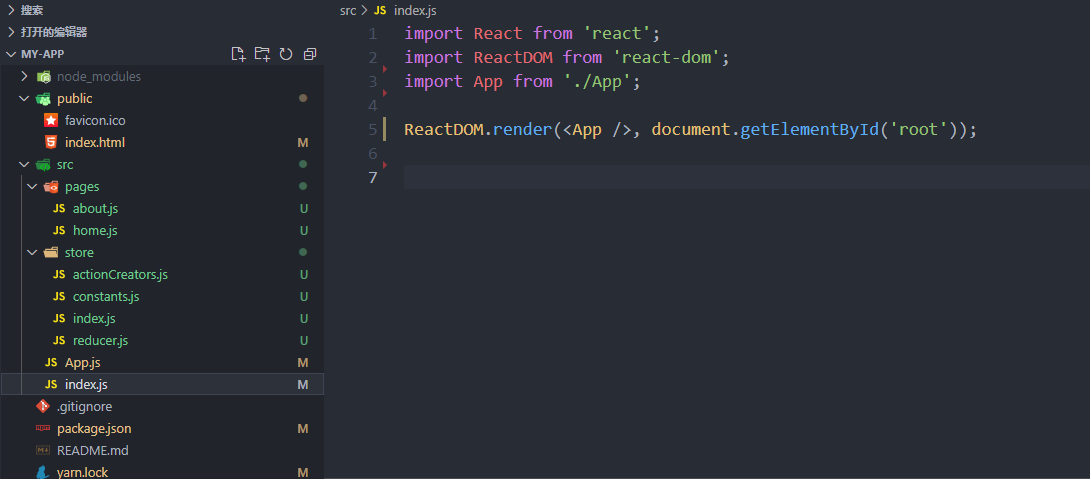
将之前做过的 store/index.js 修改为:
import {createStore} from 'redux';

import reducer from './reducer.js';

const store = createStore(reducer);

export default store;
2
3
4
5
6
7
store/constants.js
export const ADD_NUMBER = "ADD_NUMBER";
export const SUB_NUMBER = "SUB_NUMBER";
export const INCREMENT = "INCREMENT";
export const DECREMENT = "DECREMENT";
2
3
4
store/actionCreators.js
import {ADD_NUMBER, SUB_NUMBER, INCREMENT, DECREMENT} from './constants.js';

export const addAction = num => ({
  type: ADD_NUMBER,
  num
});

export const subAction = num => ({
  type: SUB_NUMBER,
  num
});

export const incAction = () => ({
  type: INCREMENT
});

export const decAction = () => ({
  type: DECREMENT
});
2
3
4
5
6
7
8
9
10
11
12
13
14
15
16
17
18
19
store/reducer.js
import {ADD_NUMBER, SUB_NUMBER, INCREMENT, DECREMENT} from './constants.js';

const defaultState = {
  counter: 0
}

function reducer(state = defaultState, action) {
  switch (action.type) {
    case ADD_NUMBER:
      return { ...state, counter: state.counter + action.num };
    case SUB_NUMBER:
      return { ...state, counter: state.counter - action.num };
    case INCREMENT:
      return { ...state, counter: state.counter + 1 };
    case DECREMENT:
      return { ...state, counter: state.counter - 1 };
    default:
      return state;
  }
}

export default reducer;
2
3
4
5
6
7
8
9
10
11
12
13
14
15
16
17
18
19
20
21
22
pages/home.js
import React, { PureComponent } from 'react';

import store from '../store';
import { addAction } from '../store/actionCreators'

export default class Home extends PureComponent {
  constructor(props) {
    super(props);

    this.state = {
      counter: store.getState().counter
    }
  }

  increment() {
    store.dispatch(addAction(1));
  }

  addNumber(num) {
    store.dispatch(addAction(num));
  }

  componentDidMount() {
    this.unsubscribe = store.subscribe(() => {
      this.setState({
        counter: store.getState().counter
      })
    })
  }

  componentWillUnmount() {
    this.unsubscribe();
  }

  render() {
    return (
      <div>
        <h1>Home</h1>
        <h2>当前计数: {this.state.counter}</h2>
        <button onClick={e => this.increment()}>+1</button>
        <button onClick={e => this.addNumber(5)}>+5</button>
      </div>
    )
  }
}
2
3
4
5
6
7
8
9
10
11
12
13
14
15
16
17
18
19
20
21
22
23
24
25
26
27
28
29
30
31
32
33
34
35
36
37
38
39
40
41
42
43
44
45
pages/about.js
import React, { PureComponent } from 'react';

import store from '../store';
import {subAction} from "../store/actionCreators";

export default class About extends PureComponent {
  constructor(props) {
    super(props);

    this.state = {
      counter: store.getState().counter
    }
  }

  decrement() {
    store.dispatch(subAction(1));
  }

  subNumber(num) {
    store.dispatch(subAction(num));
  }

  componentDidMount() {
    this.unsubscribe = store.subscribe(() => {
      this.setState({
        counter: store.getState().counter
      })
    })
  }

  componentWillUnmount() {
    this.unsubscribe();
  }

  render() {
    return (
      <div>
        <hr/>
        <h1>About</h1>
        <h2>当前计数: {this.state.counter}</h2>
        <button onClick={e => this.decrement()}>-1</button>
        <button onClick={e => this.subNumber(5)}>-5</button>
      </div>
    )
  }
}
2
3
4
5
6
7
8
9
10
11
12
13
14
15
16
17
18
19
20
21
22
23
24
25
26
27
28
29
30
31
32
33
34
35
36
37
38
39
40
41
42
43
44
45
46
App.js
import React, { PureComponent } from 'react';

import Home from './pages/home';
import About from './pages/about';

export default class App extends PureComponent {
  render() {
    return (
      <div>
        <Home/>
        <About/>
      </div>
    )
  }
}
2
3
4
5
6
7
8
9
10
11
12
13
14
15
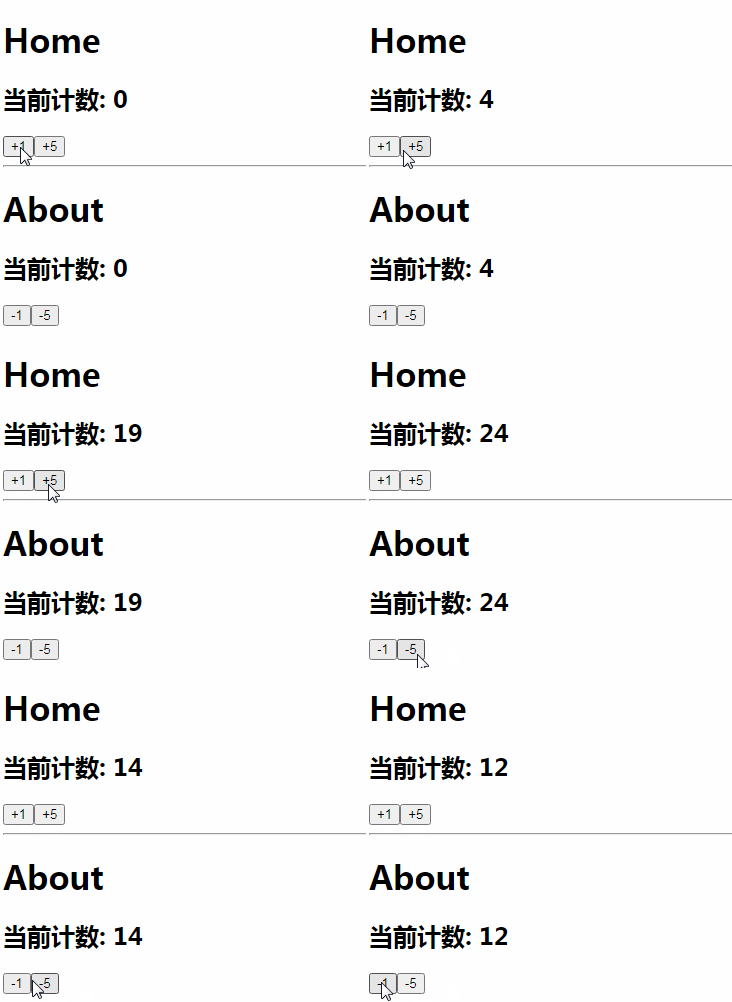
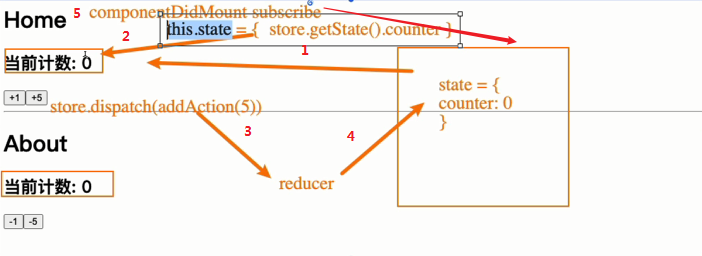
# React 中使用 Redux 的简化
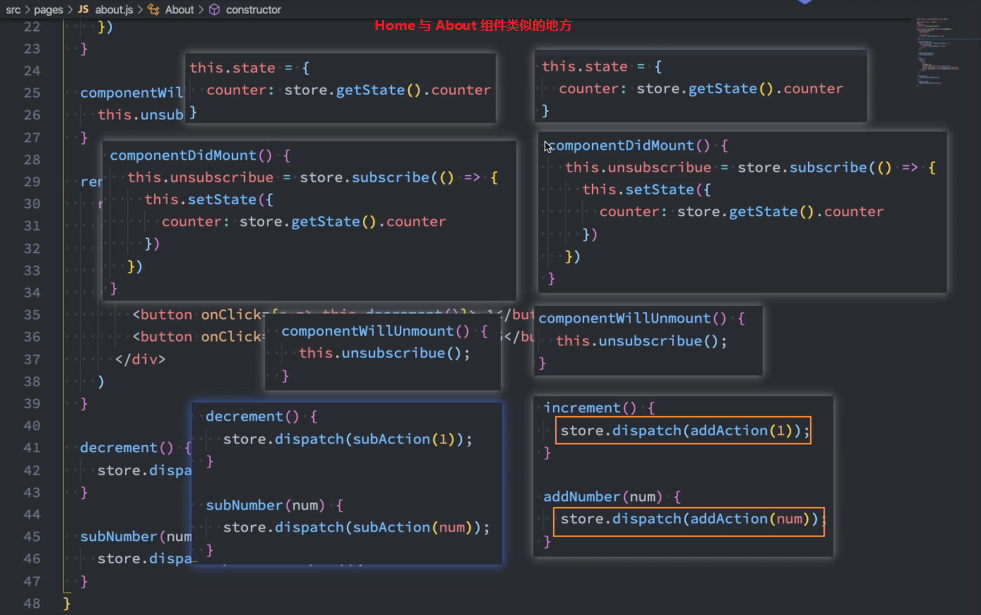
我们会发现每个使用的地方其实会有一些重复的代码:
比如监听 store 数据改变的代码,都需要在 componentDidMount 中完成;
比如派发事件,我们都需要去先拿到 store, 再调用其 dispatch 等;
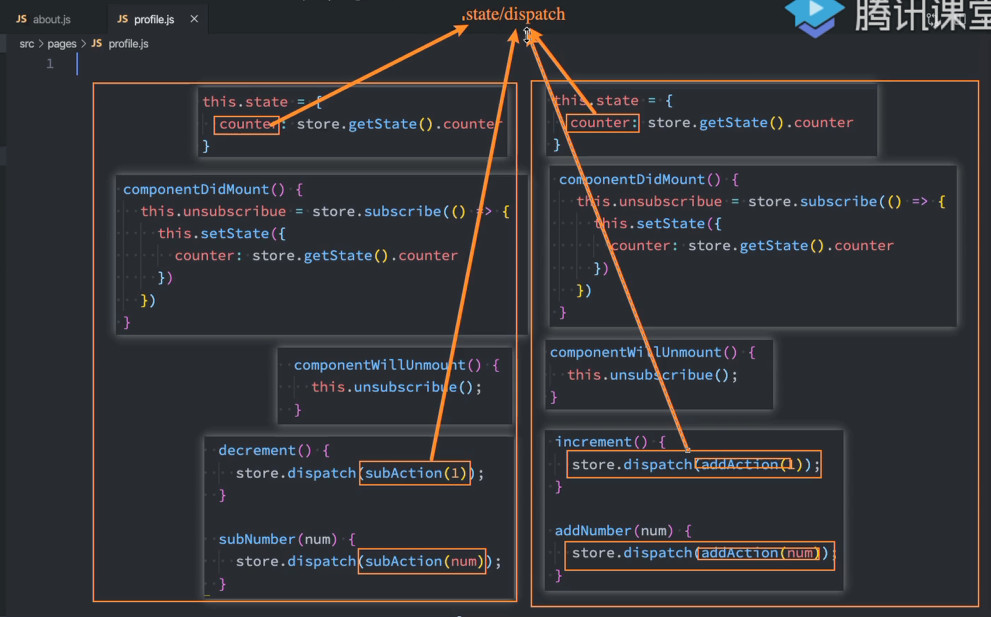
这些重复的相似逻辑需要抽取,避免在不同组件中重写一遍
代码中依赖的状态 state 和 dispatch 的 action 事件都可能是不一样的,这些不一样的应该放到一个函数
# 自定义的 connect
完整代码参考如下:
store/index.js
import {createStore} from 'redux';

import reducer from './reducer.js';

const store = createStore(reducer);

export default store;
2
3
4
5
6
7
store/constants.js
export const ADD_NUMBER = "ADD_NUMBER";
export const SUB_NUMBER = "SUB_NUMBER";
export const INCREMENT = "INCREMENT";
export const DECREMENT = "DECREMENT";
2
3
4
store/actionCreators.js
import { ADD_NUMBER, SUB_NUMBER, INCREMENT, DECREMENT } from './constants.js';

export const addAction = num => ({
  type: ADD_NUMBER,
  num
});

export const subAction = num => ({
  type: SUB_NUMBER,
  num
});

export const incAction = () => ({
  type: INCREMENT
});

export const decAction = () => ({
  type: DECREMENT
});
2
3
4
5
6
7
8
9
10
11
12
13
14
15
16
17
18
19
20
store/reducer.js
import { ADD_NUMBER, SUB_NUMBER, INCREMENT, DECREMENT } from './constants.js';

const defaultState = {
  counter: 0
}

function reducer(state = defaultState, action) {
  switch (action.type) {
    case ADD_NUMBER:
      return { ...state, counter: state.counter + action.num };
    case SUB_NUMBER:
      return { ...state, counter: state.counter - action.num };
    case INCREMENT:
      return { ...state, counter: state.counter + 1 };
    case DECREMENT:
      return { ...state, counter: state.counter - 1 };
    default:
      return state;
  }
}

export default reducer;
2
3
4
5
6
7
8
9
10
11
12
13
14
15
16
17
18
19
20
21
22
utils/connect.js
connect 函数本身接受两个参数:
- 参数一:存放 component 希望使用到的 state;
- 参数二:存放 component 希望使用到的 dispatch;
connect 函数有一个返回值,是一个高阶组件:
这个高阶组件接受一个组件作为参数,返回一个 class 组件;
在这个 class 组件中,我们进行如下操作:
在 constructor 中的 state 中保存一下我们需要获取的数据;
在 componentDidMount 中订阅 store 中数据的变化,并且执行 setState 操作;
在 componentWillUnmount 中取消订阅;
在 render 函数中返回传入的 WrappedComponent,并且将所有的状态映射到其 props 中;
import React, { PureComponent } from "react";

import store from '../store';

export function connect(mapStateToProps, mapDispatchToProp) {
  return function enhanceHOC(WrappedComponent) {
    return class extends PureComponent {
      constructor(props) {
        super(props);

        this.state = {
          storeState: mapStateToProps(store.getState())
        }
      }

      componentDidMount() {
        this.unsubscribe = store.subscribe(() => {
          this.setState({
            storeState: mapStateToProps(store.getState())
          })
        })
      }

      componentWillUnmount() {
        this.unsubscribe();
      }

      render() {
        return <WrappedComponent {...this.props}
                                 {...mapStateToProps(store.getState())}
                                 {...mapDispatchToProp(store.dispatch)} />
      }
    }
  }
}
2
3
4
5
6
7
8
9
10
11
12
13
14
15
16
17
18
19
20
21
22
23
24
25
26
27
28
29
30
31
32
33
34
35
pages/home.js
import React, { PureComponent } from 'react';

import { connect } from '../utils/connect';
import { incAction, addAction } from '../store/actionCreators'

class Home extends PureComponent {
  render() {
    return (
      <div>
        <h1>Home</h1>
        {// store 所有的 state 绑定在组件的 props 上}
        <h2>当前计数: {this.props.counter}</h2>
        {// store 所有的 dispatch 绑定在组件的 props 上}
        <button onClick={e => this.props.increment()}>+1</button>
        <button onClick={e => this.props.addNumber(5)}>+5</button>
      </div>
    )
  }
}

// 组件订阅 store 里 state 的更新,这里的 state 相当于 store.getState()
// counter 注入到组件的 props 以供使用
const mapStateToProps = state => ({
  counter: state.counter
})

// 组件所有的 action 都放一起 dispatch,这里的 dispatch 相当于 store.dispatch
// increment 、addNumber 注入到组件的 props 以供使用
const mapDispatchToProps = dispatch => ({
  increment() {
    dispatch(incAction());
  },
  addNumber(num) {
    dispatch(addAction(num));
  }
})

// connect 把 redux 的 state 和 dispatch 映射为 react 组件的 props
// 复用 constructor、componentDidMount、componentWillUnmount 订阅和取消订阅的逻辑
export default connect(mapStateToProps, mapDispatchToProps)(Home);
2
3
4
5
6
7
8
9
10
11
12
13
14
15
16
17
18
19
20
21
22
23
24
25
26
27
28
29
30
31
32
33
34
35
36
37
38
39
40
pages/about.js
import React from 'react';
import { connect } from '../utils/connect';

import { decAction, subAction } from "../store/actionCreators";

function About(props) {
  return (
    <div>
      <hr />
      <h1>About</h1>
      <h2>当前计数: {props.counter}</h2>
      <button onClick={e => props.decrement()}>-1</button>
      <button onClick={e => props.subNumber(5)}>-5</button>
    </div>
  )
}

const mapStateToProps = state => {
  return {
    counter: state.counter
  }
}

const mapDispatchToProps = dispatch => {
  return {
    decrement: function() {
      dispatch(decAction());
    },
    subNumber: function(num) {
      dispatch(subAction(num))
    }
  }
}

export default connect(mapStateToProps, mapDispatchToProps)(About);
2
3
4
5
6
7
8
9
10
11
12
13
14
15
16
17
18
19
20
21
22
23
24
25
26
27
28
29
30
31
32
33
34
35
App.js
import React, { PureComponent } from 'react';

import Home from './pages/home';
import About from './pages/about';

export default class App extends PureComponent {
  render() {
    return (
      <div>
        <Home/>
        <About/>
      </div>
    )
  }
}
2
3
4
5
6
7
8
9
10
11
12
13
14
15
index.js
import React from 'react';
import ReactDOM from 'react-dom';

import App from './App';

ReactDOM.render(
  <App/>,
  document.getElementById('root')
);
2
3
4
5
6
7
8
9
效果依旧:
# 独立无依赖的 connect
但是上面的 connect 函数有一个很大的缺陷:依赖导入用户的 store
import store from '../store';
如果我们将其封装成一个独立的库,需要依赖用户创建的 store,我们应该如何去获取呢?
难道让用户来修改我们的源码吗?不太现实;
为了与用户的业务逻辑完全区分开来,
正确的做法是我们提供一个 Provider,
Provider 来自于我们创建的 Context,让用户将 store 传入到 value 中即可;
utils/context.js
import React from 'react';

const StoreContext = React.createContext();

export { StoreContext }
2
3
4
5
utils/connect.js
import React, { PureComponent } from "react";

import { StoreContext } from './context';

export function connect(mapStateToProps, mapDispatchToProp) {
  return function enhanceHOC(WrappedComponent) {
    class EnhanceComponent extends PureComponent {
      constructor(props, context) {
        super(props, context);

        this.state = {
          storeState: mapStateToProps(context.getState())
        }
      }

      componentDidMount() {
        this.unsubscribe = this.context.subscribe(() => {
          this.setState({
            storeState: mapStateToProps(this.context.getState())
          })
        })
      }

      componentWillUnmount() {
        this.unsubscribe();
      }

      render() {
        return <WrappedComponent {...this.props}
          {...mapStateToProps(this.context.getState())}
          {...mapDispatchToProp(this.context.dispatch)} />
      }
    }

    EnhanceComponent.contextType = StoreContext;

    return EnhanceComponent;
  }
}
2
3
4
5
6
7
8
9
10
11
12
13
14
15
16
17
18
19
20
21
22
23
24
25
26
27
28
29
30
31
32
33
34
35
36
37
38
39
index.js
import React from 'react';
import ReactDOM from 'react-dom';

import store from './store';

import { StoreContext } from './utils/context';

import App from './App';

ReactDOM.render(
  <StoreContext.Provider value={store}>
    <App />
  </StoreContext.Provider>,
  document.getElementById('root')
);
2
3
4
5
6
7
8
9
10
11
12
13
14
15
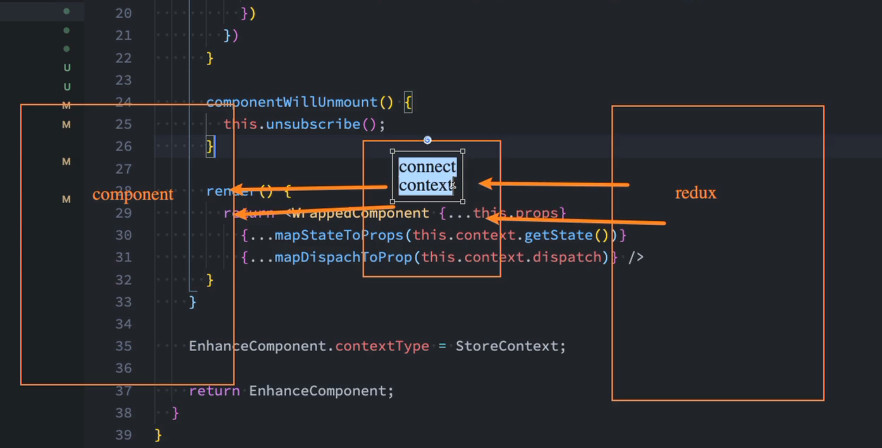
以上代码参考了 react-redux 库的 connect
# 使用 react-redux 库
yarn add react-redux
只需修改 index.js 第 6 行、第 12 - 14行
home.js 和 about.js 改为引入 react-redux 的 connect
index.js
import React from 'react';
import ReactDOM from 'react-dom';

import store from './store';

// import { StoreContext } from './utils/context';
import { Provider } from 'react-redux';

import App from './App';

ReactDOM.render(
  <Provider store={store}>
    <App />
  </Provider>,
  document.getElementById('root')
);
2
3
4
5
6
7
8
9
10
11
12
13
14
15
16
17
pages/home.js
import React, { PureComponent } from 'react';

// import { connect } from '../utils/connect';
import { connect } from 'react-redux';
import { incAction, addAction } from '../store/actionCreators'

class Home extends PureComponent {
  render() {
    return (
      <div>
        <h1>Home</h1>
        <h2>当前计数: {this.props.counter}</h2>
        <button onClick={e => this.props.increment()}>+1</button>
        <button onClick={e => this.props.addNumber(5)}>+5</button>
      </div>
    )
  }
}

const mapStateToProps = state => ({
  counter: state.counter
})

const mapDispatchToProps = dispatch => ({
  increment() {
    dispatch(incAction());
  },
  addNumber(num) {
    dispatch(addAction(num));
  }
})

export default connect(mapStateToProps, mapDispatchToProps)(Home);
2
3
4
5
6
7
8
9
10
11
12
13
14
15
16
17
18
19
20
21
22
23
24
25
26
27
28
29
30
31
32
33
pages/about.js
import React from 'react';

// import { connect } from '../utils/connect';
import { connect } from 'react-redux';

import { decAction, subAction } from '../store/actionCreators';

function About(props) {
  return (
    <div>
      <hr />
      <h1>About</h1>
      <h2>当前计数: {props.counter}</h2>
      <button onClick={e => props.decrement()}>-1</button>
      <button onClick={e => props.subNumber(5)}>-5</button>
    </div>
  )
}

const mapStateToProps = state => {
  return {
    counter: state.counter
  }
};

const mapDispatchToProps = dispatch => {
  return {
    decrement: function() {
      dispatch(decAction());
    },
    subNumber: function(num) {
      dispatch(subAction(num))
    }
  }
};

export default connect(mapStateToProps, mapDispatchToProps)(About);
2
3
4
5
6
7
8
9
10
11
12
13
14
15
16
17
18
19
20
21
22
23
24
25
26
27
28
29
30
31
32
33
34
35
36
37
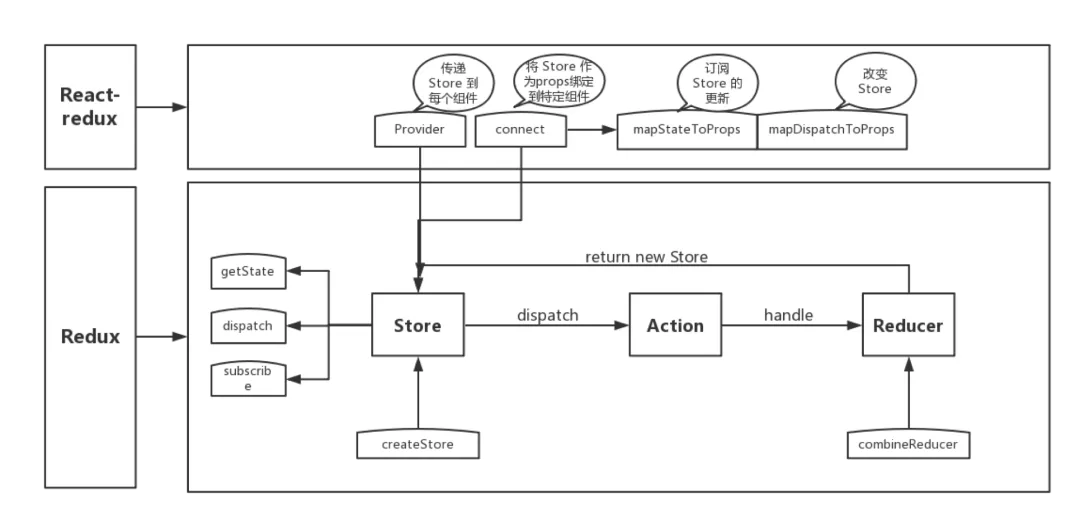
# react-redux 的源码
简单看一下 react-redux 的源码:
- 阅读核心的部分;
- 另外整个社区在 hooks 出现后大量的库转向了 hooks,所以在源码中会出现大量的 hooks 代码;
首先,我们简单看一下 Provider 的源码:
- 使用了一个 useMemo 来返回一个 contextValue 的对象;
- 这里使用 useMemo 的原因是为了进行性能的优化;
- 在依赖的 store 不改变的情况下,不会进行重新计算,返回一个新的对象;
- 下面的 Context 的 Provider 中就会将其赋值给 value 属性;
ReactReduxContext 来自另外一个文件:
connect 函数的依赖比较复杂:
调用 createConnect 来返回一个 connect 函数:
createConnect 函数的调用:
connect 函数最终调用的是 connectHOC:
- connectHOC 其实是 connectAdvanced 的函数;
- connectAdvanced 函数最终返回的是 wrapWithConnect 函数;
wrapWithConnect 函数:
# React 处理异步请求
# 组件中异步请求
真实开发中,redux 中保存的很多数据可能来自服务器,
我们需要进行异步的请求,再将数据保存到 redux 中。
在之前学习网络请求的时候我们讲过,
网络请求可以在 class 组件的componentDidMount中发送,所以我们可以有这样的结构:
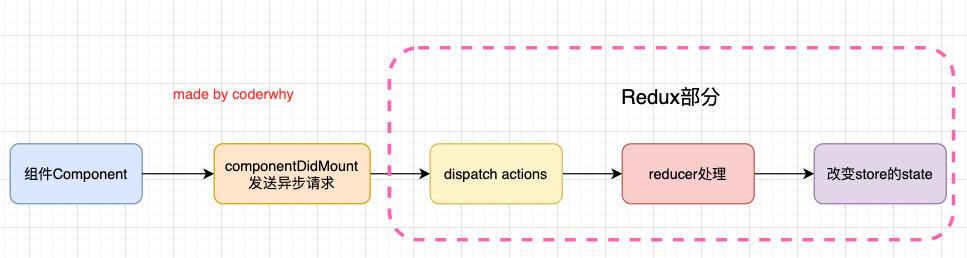
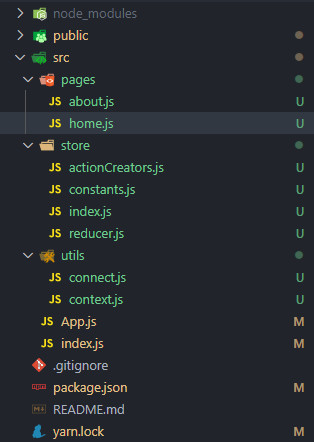
目录结构:
pages/home.js
import React, { PureComponent } from 'react';

// import { connect } from '../utils/connect';
import { connect } from 'react-redux';
import {
  incAction,
  addAction,
  changeBannersAction,
  changeRecommendsAction
} from '../store/actionCreators';

import axios from 'axios';

class Home extends PureComponent {
  componentDidMount() {
    axios.get("http://123.207.32.32:8000/home/multidata").then(res => {
      const data = res.data.data;
      this.props.changeBanners(data.banner.list);
      this.props.changeRecommends(data.recommend.list);
    })
  }

  render() {
    return (
      <div>
        <h1>Home</h1>
        <h2>当前计数: {this.props.counter}</h2>
        <button onClick={e => this.props.increment()}>+1</button>
        <button onClick={e => this.props.addNumber(5)}>+5</button>
      </div>
    )
  }
}

const mapStateToProps = state => ({
  counter: state.counter
})

const mapDispatchToProps = dispatch => ({
  increment() {
    dispatch(incAction());
  },
  addNumber(num) {
    dispatch(addAction(num));
  },
  changeBanners(banners) {
    dispatch(changeBannersAction(banners));
  },
  changeRecommends(recommends) {
    dispatch(changeRecommendsAction(recommends));
  }
})

export default connect(mapStateToProps, mapDispatchToProps)(Home);
2
3
4
5
6
7
8
9
10
11
12
13
14
15
16
17
18
19
20
21
22
23
24
25
26
27
28
29
30
31
32
33
34
35
36
37
38
39
40
41
42
43
44
45
46
47
48
49
50
51
52
53
54
pages/about.js
import React from 'react';

// import { connect } from '../utils/connect';
import { connect } from 'react-redux';

import { decAction, subAction } from '../store/actionCreators';

function About(props) {
  return (
    <div>
      <hr />
      <h1>About</h1>
      <h2>当前计数: {props.counter}</h2>
      <button onClick={e => props.decrement()}>-1</button>
      <button onClick={e => props.subNumber(5)}>-5</button>
      <h1>Banner</h1>
      <ul>
        {
          props.banners.map((item, index) => {
            return <li key={item.acm}>{item.title}</li>
          })
        }
      </ul>
      <h1>Recommend</h1>
      <ul>
        {
          props.recommends.map((item, index) => {
            return <li key={item.acm}>{item.title}</li>
          })
        }
      </ul>
    </div>
  )
}

const mapStateToProps = state => {
  return {
    counter: state.counter,
    banners: state.banners,
    recommends: state.recommends
  }
};

const mapDispatchToProps = dispatch => {
  return {
    decrement: function() {
      dispatch(decAction());
    },
    subNumber: function(num) {
      dispatch(subAction(num))
    }
  }
};

export default connect(mapStateToProps, mapDispatchToProps)(About);
2
3
4
5
6
7
8
9
10
11
12
13
14
15
16
17
18
19
20
21
22
23
24
25
26
27
28
29
30
31
32
33
34
35
36
37
38
39
40
41
42
43
44
45
46
47
48
49
50
51
52
53
54
55
store/const.js
export const ADD_NUMBER = "ADD_NUMBER";
export const SUB_NUMBER = "SUB_NUMBER";
export const INCREMENT = "INCREMENT";
export const DECREMENT = "DECREMENT";

export const CHANGE_BANNERS = "CHANGE_BANNERS";
export const CHANGE_RECOMMENDS = "CHANGE_RECOMMENDS";
2
3
4
5
6
7
store/actionCreators.js
import {
  ADD_NUMBER,
  SUB_NUMBER,
  INCREMENT,
  DECREMENT,
  CHANGE_BANNERS,
  CHANGE_RECOMMENDS
} from './constants.js';

export const addAction = num => ({
  type: ADD_NUMBER,
  num
});

export const subAction = num => ({
  type: SUB_NUMBER,
  num
});

export const incAction = () => ({
  type: INCREMENT
});

export const decAction = () => ({
  type: DECREMENT
});

export const changeBannersAction = (banners) => ({
  type: CHANGE_BANNERS,
  banners
})

export const changeRecommendsAction = (recommends) => ({
  type: CHANGE_RECOMMENDS,
  recommends
})
2
3
4
5
6
7
8
9
10
11
12
13
14
15
16
17
18
19
20
21
22
23
24
25
26
27
28
29
30
31
32
33
34
35
36
store/reducer.js
import {
  ADD_NUMBER,
  SUB_NUMBER,
  INCREMENT,
  DECREMENT,
  CHANGE_BANNERS,
  CHANGE_RECOMMENDS
} from './constants.js';

const defaultState = {
  counter: 0,
  banners: [],
  recommends: []
}

function reducer(state = defaultState, action) {
  switch (action.type) {
    case ADD_NUMBER:
      return { ...state, counter: state.counter + action.num };
    case SUB_NUMBER:
      return { ...state, counter: state.counter - action.num };
    case INCREMENT:
      return { ...state, counter: state.counter + 1 };
    case DECREMENT:
      return { ...state, counter: state.counter - 1 };
    case CHANGE_BANNERS:
      return { ...state, banners: action.banners };
    case CHANGE_RECOMMENDS:
      return { ...state, recommends: action.recommends };
    default:
      return state;
  }
}

export default reducer;
2
3
4
5
6
7
8
9
10
11
12
13
14
15
16
17
18
19
20
21
22
23
24
25
26
27
28
29
30
31
32
33
34
35
store/index.js
import {createStore} from 'redux';

import reducer from './reducer.js';

const store = createStore(reducer);

export default store;
2
3
4
5
6
7
效果如图:

# redux 中异步请求(Redux 中间件)
# redux-thunk
上面的代码有一个缺陷:
我们必须将网络请求的异步代码放到组件的生命周期中来完成;
事实上,网络请求到的数据也属于状态管理的一部分,
更好的一种方式应该是将其也交给 redux 来管理;
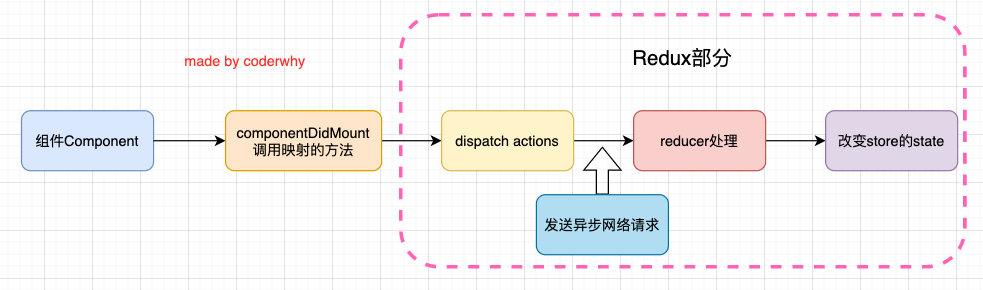
但是 redux 默认情况下是无法发送异步请求的,在 redux 中如何可以进行异步的呢?
答案就是使用中间件(Middleware);
学习过 Express 或 Koa 框架的童鞋对中间件的概念一定不陌生;
在这类框架中,Middleware 可以帮助我们在请求和响应之间嵌入一些操作的代码,
比如 cookie 解析、日志记录、文件压缩等操作;
redux 也引入了**中间件(Middleware)**的概念:
- 这个中间件的目的是在
dispatch 的 action和最终达到的 reducer之间,扩展一些自己的代码; - 比如日志记录、调用异步接口、添加代码调试功能等等;
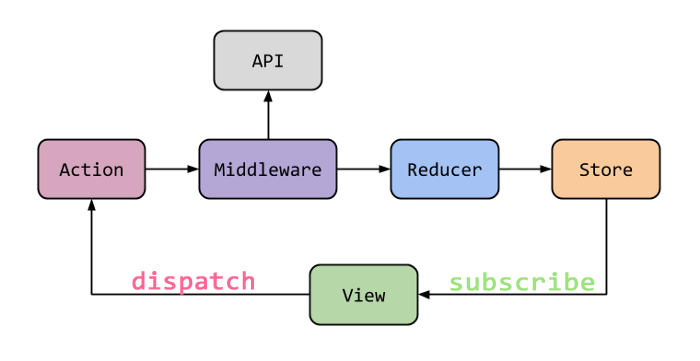
现在要做的事情就是发送异步的网络请求,所以我们可以添加对应的中间件:
- 官网推荐的、包括演示的网络请求的中间件是使用
redux-thunk;
redux-thunk 是如何做到可以发送异步的请求呢?
- 我们知道:默认情况下的 dispatch(action),action 需要是一个 JavaScript 的对象;
redux-thunk可以 dispatch(action函数),即action 可以是一个函数;- 该函数会被调用,并且可以传两个参数:dispatch 函数和 getState 函数
dispatch 函数用于我们之后再次派发 action;
getState 函数考虑到我们之后的一些操作需要依赖原来的状态,
用于让我们可以获取之前的一些状态;
yarn add redux-thunk
目录结构:
store/index.js
在创建 store 时传入应用了 middleware 的 enhancer 函数
- 通过 applyMiddleware 来结合多个 Middleware , 返回一个 enhancer;
- 将 enhancer 作为第二个参数传入到 createStore 中;
import { createStore, applyMiddleware } from 'redux';
import thunkMiddleware from 'redux-thunk';

import reducer from './reducer.js';

// 通过 applyMiddleware 来结合多个 Middleware, 返回一个 enhancer
const enhancer = applyMiddleware(thunkMiddleware);
// 将 enhancer 作为第二个参数传入到 createStore 中
const store = createStore(reducer, enhancer);

export default store;
2
3
4
5
6
7
8
9
10
11
pages/home.js
import React, { PureComponent } from 'react';

// import {connect} from '../utils/connect';
import { connect } from 'react-redux';

import {
  incAction,
  addAction,
  getHomeMultiDataAction
} from '../store/actionCreators'

class Home extends PureComponent {
  componentDidMount() {
    // 组件 dispatch 异步 action
    this.props.getHomeMultiData();
  }

  render() {
    return (
      <div>
        <h1>Home</h1>
        <h2>当前计数: {this.props.counter}</h2>
        <button onClick={e => this.props.increment()}>+1</button>
        <button onClick={e => this.props.addNumber(5)}>+5</button>
      </div>
    )
  }
}

const mapStateToProps = state => ({
  counter: state.counter
})

const mapDispatchToProps = dispatch => ({
  increment() {
    dispatch(incAction());
  },
  addNumber(num) {
    dispatch(addAction(num));
  },
  // 其它 action 返回一个对象,都是 dispatch(对象) ,以下则是 dispatch(函数)
  getHomeMultiData() {
    dispatch(getHomeMultiDataAction);
  }
})

export default connect(mapStateToProps, mapDispatchToProps)(Home);
2
3
4
5
6
7
8
9
10
11
12
13
14
15
16
17
18
19
20
21
22
23
24
25
26
27
28
29
30
31
32
33
34
35
36
37
38
39
40
41
42
43
44
45
46
47
store/actionCreators.js
import axios from 'axios';

import {
  ADD_NUMBER,
  SUB_NUMBER,
  INCREMENT,
  DECREMENT,
  CHANGE_BANNERS,
  CHANGE_RECOMMENDS,
} from './constants.js';

export const addAction = num => ({
  type: ADD_NUMBER,
  num
});

export const subAction = num => ({
  type: SUB_NUMBER,
  num
});

export const incAction = () => ({
  type: INCREMENT
});

export const decAction = () => ({
  type: DECREMENT
});

export const changeBannersAction = (banners) => ({
  type: CHANGE_BANNERS,
  banners
})

export const changeRecommendsAction = (recommends) => ({
  type: CHANGE_RECOMMENDS,
  recommends
})

// redux-thunk 中定义的异步 action 函数,
// 该函数在组件 dispatch 之后会被主动执行
export const getHomeMultiDataAction = (dispatch, getState) => {
  axios({
    url: "http://123.207.32.32:8000/home/multidata",
  }).then(res => {
    const data = res.data.data;
    dispatch(changeBannersAction(data.banner.list));
    dispatch(changeRecommendsAction(data.recommend.list));
  })
}
2
3
4
5
6
7
8
9
10
11
12
13
14
15
16
17
18
19
20
21
22
23
24
25
26
27
28
29
30
31
32
33
34
35
36
37
38
39
40
41
42
43
44
45
46
47
48
49
50
效果依旧:
# redux-devtools
利用这个工具,我们可以知道每次状态是如何被修改的,修改前后的状态变化等等;
安装该工具需要两步:
第一步:在对应的浏览器中安装相关的插件,
比如 Chrome 浏览器扩展商店中搜索Redux DevTools即可,其它方法可以参考GitHub;
第二步:在 redux 中继承 devtools
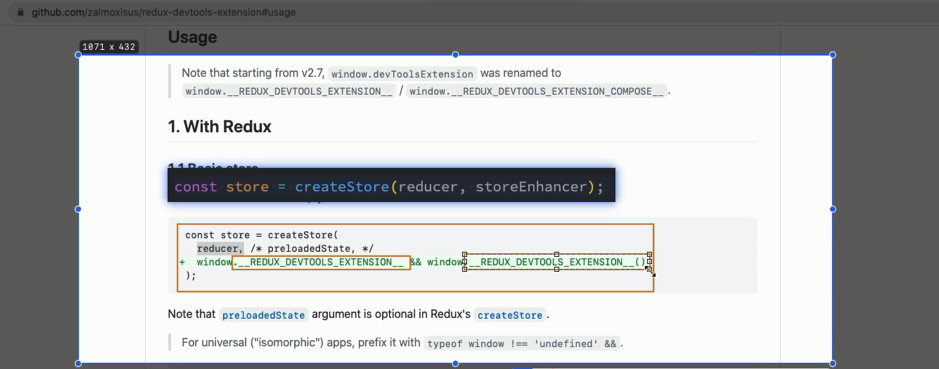
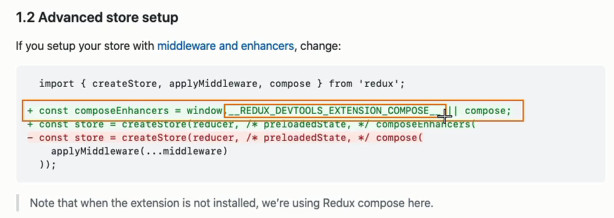
store/index.js
import { createStore, applyMiddleware, compose } from 'redux';
import thunkMiddleware from 'redux-thunk';

import reducer from './reducer.js';

const composeEnhancers = window.__REDUX_DEVTOOLS_EXTENSION_COMPOSE__({trace: true}) || compose;
// 通过 applyMiddleware 来结合多个 Middleware, 返回一个 enhancer
const enhancer = composeEnhancers(applyMiddleware(thunkMiddleware));
// 将 enhancer作为第二个参数传入到 createStore中
const store = createStore(reducer, enhancer);

export default store;
2
3
4
5
6
7
8
9
10
11
12
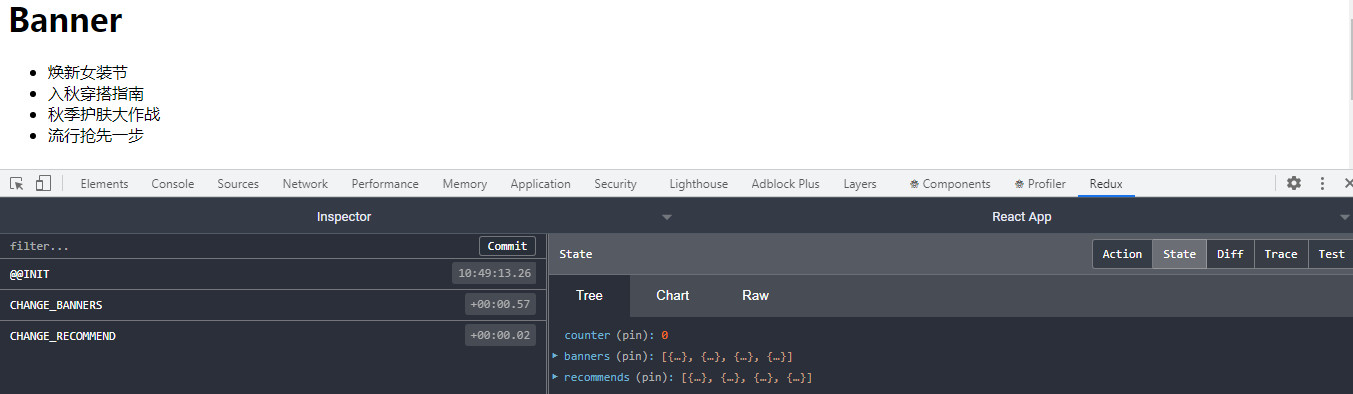
效果图:
# redux-saga
# generator 语法补充
生成器函数就是 function,普通的 function 关键字后面增加了一个星号。*
生成器函数返回迭代器对象(每个 yield 返回一个迭代器)
yield 英文直译:「退让」,让出线程占据的 cpu 时间。
yield 关键字用来暂停和恢复一个生成器函数。
yield 定义在生成器函数中返回的数据,使生成器函数执行暂停。
用 yield 来将异步回调函数的写法转为同步的能力,是一种取巧的方案,必须依赖 co 函数进行辅助。
相比较 async/await,yield 是一种临时方案,所以 yield 本身并不是给异步用的。
建议:javascript 中不要使用 yield 去处理异步,老老实实地使用 async/await 。
生成器函数在执行时能暂停,后面又能从暂停处继续执行。
调用一次 next ,消耗一个迭代器(一个 yield)
在前端代码中,我们让程序暂停和恢复的次数非常多,举例最大的点就是发送请求,等待 ajax 返回。
const response = await axios.get('/drink?id=yori');
// balabala 操作 response
2
当执行到如上代码的时候,需要发送 IO 请求,
在 response 没有回来的时候,cpu 没啥事干,就去其他应用程序里打工去了,
此时相当于整个函数执行变成了暂停状态,然后 response 回来,整个函数才恢复执行。
// 生成器函数
function* foo() {
  console.log("111");
  yield "Hello";
  // 第一次 next 执行到这,停止执行
  console.log("222");
  yield "World";
   // 第二次 next 执行到这,停止执行
  console.log("333");
  yield "Tom";
   // 第三次 next 执行到这,停止执行
  console.log("444");
}

// iterator: 迭代器
const result = foo();
console.log(result);

// 使用迭代器
// 调用一次 next, 就会消耗一个迭代器(一个 yield),返回一个包含键为 value 和 done 的迭代器
// 对象
// 迭代器的 value 是 yield 后面返回的结果
// 没有迭代器了就默认返回 {value: undefined, done: true}

// const res1 = result.next();
// console.log(res1); // 打印 {value: "Hello", done: false}
// const res2 = result.next();
// console.log(res2); // 打印 {value: "World", done: false}
// const res3 = result.next();
// console.log(res3); // 打印 {value: "Tom", done: false}
// const res4 = result.next();
// console.log(res4); // 打印 {value: undefined, done: true}


// 定义一个生成器函数, 依次可以生成 1 ~ 10 的数字
function* generateNumber() {
  for (var i = 1; i <= 10; i++) {
    yield i;
  }
}
const numIt = generateNumber();
console.log(numIt.next().value);


// generator 和 Promise 一起来使用
function* bar() {
  console.log("1111");
  const result = yield new Promise((resolve, reject) => {
    setTimeout(() => {
      resolve("Hello Generator");
    }, 3000);
  });
  console.log(result);
}

const it = bar();
// it.next().value 表示迭代器对象中的 promise 对象,即 yield 返回的 promise 对象
it.next().value.then(res => {
  // 第一次 it.next() 执行 console.log("111") 、 yield 返回 promise 对象
  // 赋值给 result 属于 console.log("111") 、 yield 返回 promise 对象之后执行的代码
  // 所以需要 it.next() 执行赋值语句,赋值给 result
  // next 方法可以带一个参数,该参数会被当作上一个 yield 表达式的返回值。
  it.next(res)
})

// await 直接返回 resolve 值
async function bar() {
  const result = await new Promise((resolve, reject) => {
    setTimeout(() => {
      resolve("Hello Generator");
    }, 3000);
  });
  console.log(result);
}
bar(); // 输出 Hello Generator
2
3
4
5
6
7
8
9
10
11
12
13
14
15
16
17
18
19
20
21
22
23
24
25
26
27
28
29
30
31
32
33
34
35
36
37
38
39
40
41
42
43
44
45
46
47
48
49
50
51
52
53
54
55
56
57
58
59
60
61
62
63
64
65
66
67
68
69
70
71
72
73
74
75
# redux-saga 的使用
redux-saga 优点: 没有与 actionCreators.js 耦合,dispatch() 时依然传入的是对象
yarn add redux-saga
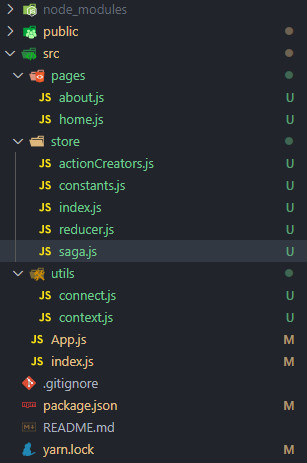
目录结构
store/constants.js
export const ADD_NUMBER = "ADD_NUMBER";
export const SUB_NUMBER = "SUB_NUMBER";
export const INCREMENT = "INCREMENT";
export const DECREMENT = "DECREMENT";

export const CHANGE_BANNERS = "CHANGE_BANNERS";
export const CHANGE_RECOMMEND = "CHANGE_RECOMMEND";

export const FETCH_HOME_MULTIDATA = "FETCH_HOME_MULTIDATA";
2
3
4
5
6
7
8
9
store/actionCreators.js
import axios from 'axios';

import {
  ADD_NUMBER,
  SUB_NUMBER,
  INCREMENT,
  DECREMENT,
  CHANGE_BANNERS,
  CHANGE_RECOMMEND,
  FETCH_HOME_MULTIDATA
} from './constants.js';

export const addAction = num => ({
  type: ADD_NUMBER,
  num
});

export const subAction = num => ({
  type: SUB_NUMBER,
  num
});

export const incAction = () => ({
  type: INCREMENT
});

export const decAction = () => ({
  type: DECREMENT
});


// 轮播图和推荐的 action
export const changeBannersAction = (banners) => ({
  type: CHANGE_BANNERS,
  banners
});

export const changeRecommendAction = (recommends) => ({
  type: CHANGE_RECOMMEND,
  recommends
});


// redux-thunk 中定义的 action 函数
export const getHomeMultiDataAction = (dispatch, getState) => {
  axios({
    url: "http://123.207.32.32:8000/home/multidata",
  }).then(res => {
    const data = res.data.data;
    dispatch(changeBannersAction(data.banner.list));
    dispatch(changeRecommendAction(data.recommend.list));
  })
}


// redux-saga 拦截的 action
export const fetchHomeMultiDataAction = {
  type: FETCH_HOME_MULTIDATA
}
2
3
4
5
6
7
8
9
10
11
12
13
14
15
16
17
18
19
20
21
22
23
24
25
26
27
28
29
30
31
32
33
34
35
36
37
38
39
40
41
42
43
44
45
46
47
48
49
50
51
52
53
54
55
56
57
58
59
store/index.js
集成 redux-saga 中间件
import { createStore, applyMiddleware, compose } from 'redux';
import thunkMiddleware from 'redux-thunk';
import createSagaMiddleware from 'redux-saga';

import saga from './saga';
import reducer from './reducer.js';

// composeEnhancers函数
const composeEnhancers = window.__REDUX_DEVTOOLS_EXTENSION_COMPOSE__({trace: true}) || compose;

// 应用一些中间件
// 1.引入 thunkMiddleware 中间件(上面)
// 2.创建 sagaMiddleware 中间件
const sagaMiddleware = createSagaMiddleware();
// 3. applyMiddleware 使用这个中间件
const storeEnhancer = composeEnhancers(applyMiddleware(thunkMiddleware, sagaMiddleware));
const store = createStore(reducer, storeEnhancer);

// 4. run() 要求传入生成器函数,启动 saga 中间件,并且传入要监听的 generator
sagaMiddleware.run(saga);

export default store;
2
3
4
5
6
7
8
9
10
11
12
13
14
15
16
17
18
19
20
21
22
store/saga.js
takeEvery:可以传入多个监听的 actionType ,每一个都可以被执行(对应有一个 takeLatest ,会取消前面的)
put:在 saga 中派发 action 不再是通过 dispatch , 而是通过 put
all:可以在 yield 的时候 put 多个 action
import { takeEvery, put, all, takeLatest } from 'redux-saga/effects';
import {
  FETCH_HOME_MULTIDATA, ADD_NUMBER
} from './constants';
import {
  changeBannersAction,
  changeRecommendsAction
} from './actionCreators';
import axios from 'axios';

// 参数 action 为上一个 action
function* fetchHomeMultiData(action) {
  const res = yield axios.get("http://123.207.32.32:8000/home/multidata");
  const banners = res.data.data.banner.list;
  const recommends = res.data.data.recommend.list;
  // 第一种写法
  // yield put(changeBannersAction(banners));
  // yield put(changeRecommendAction(recommends));
  yield all([
    yield put(changeBannersAction(banners)),
    yield put(changeRecommendsAction(recommends))
  ])
}

function* mySaga() {
  // takeLatest 与 takeEvery区别:
  // takeLatest: 一次只能监听一个对应的 action
  // takeEvery: 每一个 action 都会被执行
  // 第一种写法
  // yield takeEvery(FETCH_HOME_MULTIDATA, fetchHomeMultiData);
  yield all([
    takeEvery(FETCH_HOME_MULTIDATA, fetchHomeMultiData),
    // takeLatest(ADD_NUMBER, fetchHomeMultiData),
  ]);
}

export default mySaga;
2
3
4
5
6
7
8
9
10
11
12
13
14
15
16
17
18
19
20
21
22
23
24
25
26
27
28
29
30
31
32
33
34
35
36
37
home.js
import React, { PureComponent } from 'react';

// import {connect} from '../utils/connect';
import { connect } from 'react-redux';

import {
  incAction,
  addAction,
  getHomeMultiDataAction,
  fetchHomeMultiDataAction
} from '../store/actionCreators'

class Home extends PureComponent {
  componentDidMount() {
    this.props.getHomeMultiData();
  }

  render() {
    return (
      <div>
        <h1>Home</h1>
        <h2>当前计数: {this.props.counter}</h2>
        <button onClick={e => this.props.increment()}>+1</button>
        <button onClick={e => this.props.addNumber(5)}>+5</button>
      </div>
    )
  }
}

const mapStateToProps = state => ({
  counter: state.counter
})

const mapDispatchToProps = dispatch => ({
  increment() {
    dispatch(incAction());
  },
  addNumber(num) {
    dispatch(addAction(num));
  },
  getHomeMultiData() {
    dispatch(fetchHomeMultiDataAction);
  }
})

export default connect(mapStateToProps, mapDispatchToProps)(Home);
2
3
4
5
6
7
8
9
10
11
12
13
14
15
16
17
18
19
20
21
22
23
24
25
26
27
28
29
30
31
32
33
34
35
36
37
38
39
40
41
42
43
44
45
46
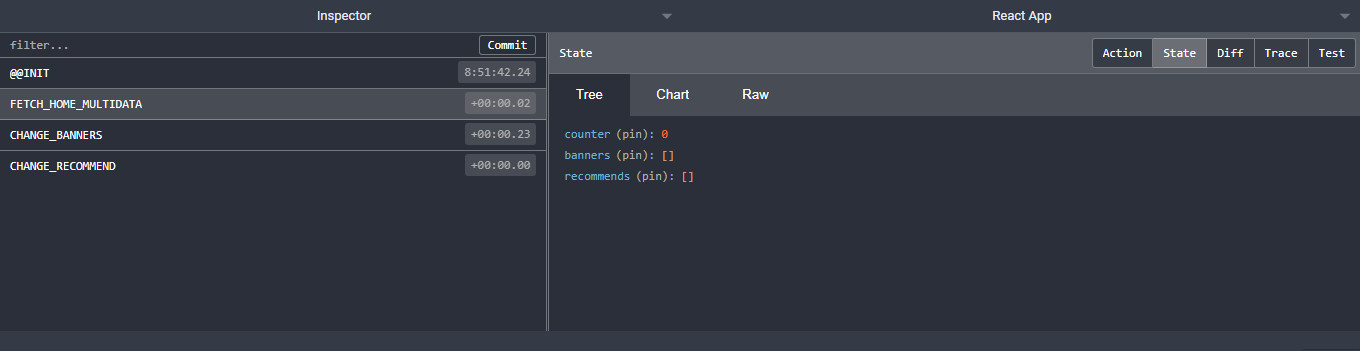
效果依旧:
多了一个空的拦截 action :
# 中间件的原理
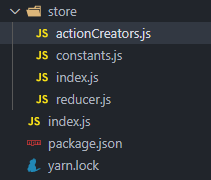
目录结构
store/constants.js
export const ADD_NUMBER = "ADD_NUMBER";
export const SUB_NUMBER = "SUB_NUMBER";
export const INCREMENT = "INCREMENT";
export const DECREMENT = "DECREMENT";
2
3
4
store/actionCreators.js
import { ADD_NUMBER, SUB_NUMBER, INCREMENT, DECREMENT} from './constants.js';

export const addAction = num => ({
  type: ADD_NUMBER,
  num
});

export const subAction = num => ({
  type: SUB_NUMBER,
  num
});

export const incAction = () => ({
  type: INCREMENT
});

export const decAction = () => ({
  type: DECREMENT
});
2
3
4
5
6
7
8
9
10
11
12
13
14
15
16
17
18
19
store/reducer.js
import { ADD_NUMBER, SUB_NUMBER, INCREMENT, DECREMENT} from './constants.js';

const defaultState = {
  counter: 0
}

function reducer(state = defaultState, action) {
  switch (action.type) {
    case ADD_NUMBER:
      return { ...state, counter: state.counter + action.num };
    case SUB_NUMBER:
      return { ...state, counter: state.counter - action.num };
    case INCREMENT:
      return { ...state, counter: state.counter + 1 };
    case DECREMENT:
      return { ...state, counter: state.counter - 1 };
    default:
      return state;
  }
}

export default reducer;
2
3
4
5
6
7
8
9
10
11
12
13
14
15
16
17
18
19
20
21
22
store/index.js
import redux from 'redux';

import reducer from './reducer.js';

const store = redux.createStore(reducer);

export default store;
2
3
4
5
6
7
# 打印日志需求
中间件的目的是在 redux 中插入一些自己的操作:
比如我们现在有一个需求:
在 dispatch 之前,打印一下本次的 action 对象,
dispatch 完成之后可以打印一下最新的 store state;
也就是需要将对应的代码插入到 redux 的某部分,让之后所有的 dispatch 都可以包含这样的操作;
如果没有中间件,我们是否可以实现类似的代码呢?
当然可以,类似下面的方式:
index.js
import store from './store/index.js';
import { addAction, subAction } from './store/actionCreators.js';

console.log("dispatching:", addAction(5));
store.dispatch(addAction(5));
console.log("new state:", store.getState());

console.log("dispatching:", addAction(10));
store.dispatch(subAction(10));
console.log("new state:", store.getState());
2
3
4
5
6
7
8
9
10
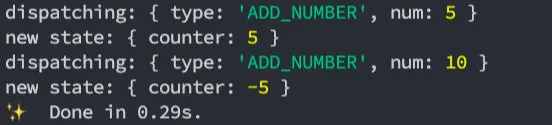
但是这种方式缺陷非常明显:
- 首先,每一次的 dispatch 操作,我们都需要在前面加上这样的逻辑代码;
- 其次,存在大量重复的代码,会非常麻烦和臃肿;
是否有一种更优雅的方式来处理这样的相同逻辑呢?
- 我们可以将代码封装到一个独立的函数中
index.js
import store from './store/index.js';
import { addAction, subAction } from './store/actionCreators.js';

function dispatchAndLog(action) {
  console.log("dispatching:", action);
  store.dispatch(action));
  console.log("new state:", store.getState());
}

dispatchAndLog(addAction(10));
2
3
4
5
6
7
8
9
10
但是这样的代码有一个非常大的缺陷:
- 调用者(使用者)在使用我的 dispatch 时,必须使用我另外封装的一个函数 dispatchAndLog;
- 显然,对于调用者来说,很难记住这样的 API,更加习惯的方式是直接调用 dispatch;
我们需要对代码进行优化
# 修改 dispatch
事实上,我们可以利用一个 hack 一点的技术:Monkey Patching,利用它可以修改原有的程序逻辑;
我们对代码进行如下的修改:
- 我们直接修改了 dispatch 的调用过程;
- 在调用 dispatch 的过程中,真正调用的函数其实是 dispatchAndLog;
index.js
import store from './store/index.js';
import { addAction, subAction } from './store/actionCreators.js';

let next = store.dispatch;

function dispatchAndLog(action) {
  console.log("dispatching:", action);
  next(action);
  console.log("new state:", store.getState());
}

store.dispatch = dispatchAndLog;

store.dispatch(addAction(5));
store.dispatch(subAction(10));
2
3
4
5
6
7
8
9
10
11
12
13
14
15
当然,我们可以将它封装到一个模块中,只要调用这个模块中的函数,就可以对 store 进行这样的处理:
index.js
import store from './store/index.js';
import { addAction, subAction } from './store/actionCreators.js';

function patchLogging(store) {
  let next = store.dispatch;

  function dispatchAndLog(action) {
    console.log("dispatching:", action);
    next(action);
    console.log("new state:", store.getState());
  }

  store.dispatch = dispatchAndLog;
}
2
3
4
5
6
7
8
9
10
11
12
13
14
# thunk 需求
redux-thunk 的作用:
我们知道 redux 利用中间件 redux-thunk
可以让我们的 dispatch 不再只是处理对象,并且可以处理函数;
那么 redux-thunk 中的基本实现过程是怎么样的呢?事实上非常的简单。
我们来看下面的代码:
- 我们对 dispatch 进行转换,这个 dispatch 会判断传入的 action
- 如果传入的 action 为函数,则调用该函数并传给它两个参数:store.dispatch, store.getState
index.js
import store from './store/index.js';
import { addAction, subAction } from './store/actionCreators.js';

function patchLogging(store) {
  let next = store.dispatch;

  function dispatchAndLog(action) {
    console.log("dispatching:", action);
    next(action);
    console.log("new state:", store.getState());
  }

  store.dispatch = dispatchAndLog;
}

function patchThunk(store) {
  let next = store.dispatch;

  function dispatchAndThunk(action) {
    if (typeof action === "function") {
      action(store.dispatch, store.getState);
    } else {
      next(action);
    }
  }

  store.dispatch = dispatchAndThunk;
}
2
3
4
5
6
7
8
9
10
11
12
13
14
15
16
17
18
19
20
21
22
23
24
25
26
27
28
将两个 patch 应用起来,进行测试:
patchLogging(store);
// 覆盖前一个函数修改 store.dispatch 的操作
patchThunk(store);

function getData(dispatch) {
  setTimeout(() => {
    dispatch(subAction(10));
  }, 1000)
}

// 传入函数
store.dispatch(getData);
2
3
4
5
6
7
8
9
10
11
12

# 合并中间件
单个调用某个函数来合并中间件并不是特别的方便,我们可以封装一个函数来实现所有的中间件合并:
index.js
import store from './store/index.js';
import { addAction, subAction } from './store/actionCreators.js';

function patchLogging(store) {
  let next = store.dispatch;

  function dispatchAndLog(action) {
    console.log("dispatching:", action);
    next(action);
    console.log("new state:", store.getState());
  }

  store.dispatch = dispatchAndLog;
}

function patchThunk(store) {
  let next = store.dispatch;

  function dispatchAndThunk(action) {
    if (typeof action === "function") {
      action(store.dispatch, store.getState);
    } else {
      next(action);
    }
  }

  store.dispatch = dispatchAndThunk;
}

function applyMiddleware(store, middlewares) {
  middlewares = middlewares.slice();

  middlewares.forEach(middleware => {
    store.dispatch = middleware(store);
  })
}

applyMiddleware(store, [patchLogging, patchThunk]);
2
3
4
5
6
7
8
9
10
11
12
13
14
15
16
17
18
19
20
21
22
23
24
25
26
27
28
29
30
31
32
33
34
35
36
37
38
我们理解一下代码的流程:
下图错了,patchDelay 应为 patchLogging

当然,真实的中间件实现起来会更加的灵活,
这里我们仅仅做一个抛砖引玉,有兴趣可以参考 redux 合并中间件的源码流程。
# reducer 的拆分
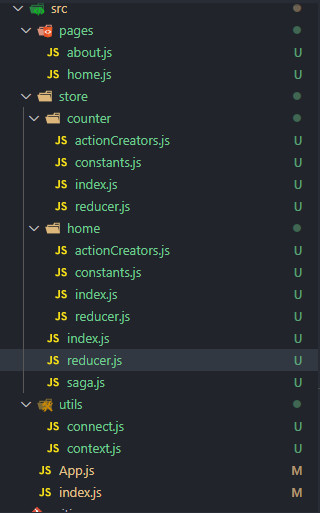
目录结构
store/counter/constants.js
export const ADD_NUMBER = "ADD_NUMBER";
export const SUB_NUMBER = "SUB_NUMBER";
export const INCREMENT = "INCREMENT";
export const DECREMENT = "DECREMENT";
2
3
4
store/counter/actionCreators.js
import {
  ADD_NUMBER,
  SUB_NUMBER,
  INCREMENT,
  DECREMENT,
} from './constants.js';

export const addAction = num => ({
  type: ADD_NUMBER,
  num
});

export const subAction = num => ({
  type: SUB_NUMBER,
  num
});

export const incAction = () => ({
  type: INCREMENT
});

export const decAction = () => ({
  type: DECREMENT
});
2
3
4
5
6
7
8
9
10
11
12
13
14
15
16
17
18
19
20
21
22
23
24
store/counter/reducer.js
import {
  ADD_NUMBER,
  SUB_NUMBER,
  INCREMENT,
  DECREMENT
} from './constants.js';

// 拆分 counterReducer
const initialCounterState = {
  counter: 0
}

function counterReducer(state = initialCounterState, action) {
  switch (action.type) {
    case ADD_NUMBER:
      return { ...state, counter: state.counter + action.num };
    case SUB_NUMBER:
      return { ...state, counter: state.counter - action.num };
    case INCREMENT:
      return { ...state, counter: state.counter + 1 };
    case DECREMENT:
      return { ...state, counter: state.counter - 1 };
    default:
      return state;
  }
}

export default counterReducer;
2
3
4
5
6
7
8
9
10
11
12
13
14
15
16
17
18
19
20
21
22
23
24
25
26
27
28
store/counter/index.js
import reducer from './reducer';

export {
  reducer
}
2
3
4
5
store/home/constants.js
export const FETCH_HOME_MULTIDATA = "FETCH_HOME_MULTIDATA";
export const CHANGE_BANNERS = "CHANGE_BANNERS";
export const CHANGE_RECOMMENDS = "CHANGE_RECOMMENDS";
2
3
store/home/actionCreators.js
import axios from 'axios';

import {
  CHANGE_BANNERS,
  CHANGE_RECOMMENDS,
  FETCH_HOME_MULTIDATA
} from './constants.js';

// 轮播图和推荐的action
export const changeBannersAction = (banners) => ({
  type: CHANGE_BANNERS,
  banners
});

export const changeRecommendsAction = (recommends) => ({
  type: CHANGE_RECOMMENDS,
  recommends
});


// redux-thunk 中定义的 action 函数
export const getHomeMultiDataAction = (dispatch, getState) => {
  axios({
    url: "http://123.207.32.32:8000/home/multidata",
  }).then(res => {
    const data = res.data.data;
    dispatch(changeBannersAction(data.banner.list));
    dispatch(changeRecommendsAction(data.recommend.list));
  })
}


// redux-saga 拦截的 action
export const fetchHomeMultiDataAction = {
  type: FETCH_HOME_MULTIDATA
}
2
3
4
5
6
7
8
9
10
11
12
13
14
15
16
17
18
19
20
21
22
23
24
25
26
27
28
29
30
31
32
33
34
35
36
store/home/reducer.js
import { CHANGE_BANNERS, CHANGE_RECOMMENDS } from './constants.js';

// 拆分 homeReducer
const initialHomeState = {
  banners: [],
  recommends: []
}

function homeReducer(state = initialHomeState, action) {
  switch (action.type) {
    case CHANGE_BANNERS:
      return { ...state, banners: action.banners };
    case CHANGE_RECOMMENDS:
      return { ...state, recommends: action.recommends };
    default:
      return state;
  }
}

export default homeReducer;
2
3
4
5
6
7
8
9
10
11
12
13
14
15
16
17
18
19
20
store/home/index.js
import reducer from './reducer';

export {
  reducer
}
2
3
4
5
store/index.js
创建 store,集成中间件
import { createStore, applyMiddleware, compose } from 'redux';
import thunkMiddleware from 'redux-thunk';
import createSagaMiddleware from 'redux-saga';

import saga from './saga';
import reducer from './reducer.js';

// composeEnhancers 函数启用 Redux 插件,使浏览器插件的状态追踪生效s
const composeEnhancers = window.__REDUX_DEVTOOLS_EXTENSION_COMPOSE__({trace: true}) || compose;

// 应用一些中间件
// 1.引入 thunkMiddleware 中间件(上面)
// 2.创建 sagaMiddleware 中间件
const sagaMiddleware = createSagaMiddleware();

const storeEnhancer = applyMiddleware(thunkMiddleware, sagaMiddleware);
const store = createStore(reducer, composeEnhancers(storeEnhancer));
// 启用 saga
sagaMiddleware.run(saga);

export default store;
2
3
4
5
6
7
8
9
10
11
12
13
14
15
16
17
18
19
20
21
store/reducer.js
合并 reducer
目前我们合并的方式是通过每次调用 reducer 函数自己来返回一个新的对象,
事实上,redux 给我们提供了一个 combineReducers 函数可以方便的让我们对多个 reducer 进行合并:
import { reducer as counterReducer } from './counter';
import { reducer as homeReducer } from './home';

import { combineReducers } from 'redux';

// function reducer(state = {}, action) {
//   return {
//     counterInfo: counterReducer(state.counterInfo, action),
//     homeInfo: homeReducer(state.homeInfo, action)
//   }
// }

const reducer = combineReducers({
  counterInfo: counterReducer,
  homeInfo: homeReducer
});

export default reducer;
2
3
4
5
6
7
8
9
10
11
12
13
14
15
16
17
18
store/saga.js
import { takeEvery, put, all } from 'redux-saga/effects';
import axios from 'axios';
import { FETCH_HOME_MULTIDATA } from './home/constants';
import { changeBannersAction, changeRecommendsAction } from './home/actionCreators';

function* fetchHomeMultiData(action) {
  const res = yield axios.get("http://123.207.32.32:8000/home/multidata");
  const banners = res.data.data.banner.list;
  const recommends = res.data.data.recommend.list;
  // yield put(changeBannersAction(banners));
  // yield put(changeRecommendAction(recommends));
  yield all([
    yield put(changeBannersAction(banners)),
    yield put(changeRecommendsAction(recommends))
  ])
}

function* mySaga() {
  // takeLatest takeEvery区别:
  // takeLatest: 一次只能监听一个对应的action
  // takeEvery: 每一个都会被执行
  yield all([
    takeEvery(FETCH_HOME_MULTIDATA, fetchHomeMultiData),
    // takeLatest(ADD_NUMBER, fetchHomeMultiData),
  ]);
}

export default mySaga;
2
3
4
5
6
7
8
9
10
11
12
13
14
15
16
17
18
19
20
21
22
23
24
25
26
27
28
pages/about.js
import React from 'react';
// import { connect } from '../utils/connect';
import { connect } from 'react-redux';

import { decAction, subAction } from '../store/counter/actionCreators';

function About(props) {
  return (
    <div>
      <hr />
      <h1>About</h1>
      <h2>当前计数: {props.counter}</h2>
      <button onClick={e => props.decrement()}>-1</button>
      <button onClick={e => props.subNumber(5)}>-5</button>
      <h1>Banner</h1>
      <ul>
        {
          props.banners.map((item, index) => {
            return <li key={item.acm}>{item.title}</li>
          })
        }
      </ul>
      <h1>Recommend</h1>
      <ul>
        {
          props.recommends.map((item, index) => {
            return <li key={item.acm}>{item.title}</li>
          })
        }
      </ul>
    </div>
  )
}

const mapStateToProps = state => {
  return {
    counter: state.counterInfo.counter,
    banners: state.homeInfo.banners,
    recommends: state.homeInfo.recommends
  }
};

const mapDispatchToProps = dispatch => {
  return {
    decrement: function () {
      dispatch(decAction());
    },
    subNumber: function (num) {
      dispatch(subAction(num))
    }
  }
};

export default connect(mapStateToProps, mapDispatchToProps)(About);
2
3
4
5
6
7
8
9
10
11
12
13
14
15
16
17
18
19
20
21
22
23
24
25
26
27
28
29
30
31
32
33
34
35
36
37
38
39
40
41
42
43
44
45
46
47
48
49
50
51
52
53
54
pages/home.js
import React, { PureComponent } from 'react';

// import {connect} from '../utils/connect';
import { connect } from 'react-redux';

import { incAction, addAction } from '../store/counter/actionCreators';
import { fetchHomeMultiDataAction } from '../store/home/actionCreators';

class Home extends PureComponent {
  componentDidMount() {
    this.props.getHomeMultiData();
  }

  render() {
    return (
      <div>
        <h1>Home</h1>
        <h2>当前计数: {this.props.counter}</h2>
        <button onClick={e => this.props.increment()}>+1</button>
        <button onClick={e => this.props.addNumber(5)}>+5</button>
      </div>
    )
  }
}

const mapStateToProps = state => ({
  counter: state.counterInfo.counter
})

const mapDispatchToProps = dispatch => ({
  increment() {
    dispatch(incAction());
  },
  addNumber(num) {
    dispatch(addAction(num));
  },
  getHomeMultiData() {
    dispatch(fetchHomeMultiDataAction);
  }
})

export default connect(mapStateToProps, mapDispatchToProps)(Home);
2
3
4
5
6
7
8
9
10
11
12
13
14
15
16
17
18
19
20
21
22
23
24
25
26
27
28
29
30
31
32
33
34
35
36
37
38
39
40
41
42
# combineReducers
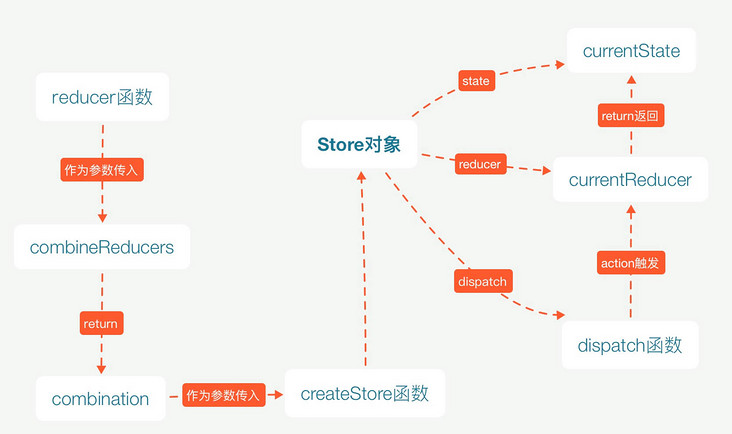
combineReducers 是如何实现的呢?
- 事实上,它将传入的 reducers 合并到一个对象中,
最终返回一个 combination 的函数;
combination 函数的主要作用是返回一个挂载全部 state 的对象。
当 combination 函数被调用时,实际就是循环调用传入的 reducer 函数,返回 state 对象。
在执行 combination 函数的过程中,
它会通过判断前后返回的数据是否相同来决定返回之前的 state 还是新的 state;
新的 state 会触发订阅者发生对应的刷新,而旧的 state 可以避免一些重复无意义的渲染;
从 71 行开始,核心代码在 77行 - 97 行
// 传入的 reducers 是个对象
/**
 * 合并 reducer
 * 接收参数:
 * {
 *    xxReducer: (state, action) => {
 *        ...
 *        return state;
 *    },
 *    ...
 * }
 * @param {*} reducers
 *
 * 返回值是一个纯函数,接收当前 state 和 action,这个纯函数返回更新后的 state
 * @return (state, action) => state
 */
export default function combineReducers(reducers) {
  // const reducerKeys = ["counterInfo", "homeInfo"]
  const reducerKeys = Object.keys(reducers)
  const finalReducers = {}
  for (let i = 0; i < reducerKeys.length; i++) {
    const key = reducerKeys[i]

    if (process.env.NODE_ENV !== 'production') {
      if (typeof reducers[key] === 'undefined') {
        warning(`No reducer provided for key "${key}"`)
      }
    }

    if (typeof reducers[key] === 'function') {
      finalReducers[key] = reducers[key]
    }
  }
  // finalReducers 为 { counterInfo: counterReducer, homeInfo: homeReducer }
  // const finalReducerKeys = ["counterInfo", "homeInfo"]
  const finalReducerKeys = Object.keys(finalReducers)

  // This is used to make sure we don't warn about the same
  // keys multiple times.
  let unexpectedKeyCache
  if (process.env.NODE_ENV !== 'production') {
    unexpectedKeyCache = {}
  }

  let shapeAssertionError
  try {
    assertReducerShape(finalReducers)
  } catch (e) {
    shapeAssertionError = e
  }

  return function combination(state = {}, action) {
    if (shapeAssertionError) {
      throw shapeAssertionError
    }

    if (process.env.NODE_ENV !== 'production') {
      const warningMessage = getUnexpectedStateShapeWarningMessage(
        state,
        finalReducers,
        action,
        unexpectedKeyCache
      )
      if (warningMessage) {
        warning(warningMessage)
      }
    }

    let hasChanged = false
    const nextState = {}
    // 遍历每一个 reducer
    for (let i = 0; i < finalReducerKeys.length; i++) {
      // key 为 counterInfo、homeInfo
      const key = finalReducerKeys[i]
      // 单个 reducer: counterReducer、homeReducer
      const reducer = finalReducers[key]
      // 根据每次遍历的 key 获取旧 state
      // 比如第一次遍历, counterReducer 走 default 分支,
      // state 为 {counterInfo: {counter: 0}, ...}
      // 所以 state["counterInfo"] 为 {counter: 0}
      const previousStateForKey = state[key]
      // 组件 dispatch 调用 counterReducer ,得到当前单个 reducer 生成新的 state
      // 此时 counterReducer({counter: 0} , action) 返回 {counter: 1}
      // state 变为 {counterInfo: {counter: 1}, ...}
      // 组件不调用则 state 仍然为 {counterInfo: {counter: 0}, ...}
      const nextStateForKey = reducer(previousStateForKey, action)
      if (typeof nextStateForKey === 'undefined') {
        const errorMessage = getUndefinedStateErrorMessage(key, action)
        throw new Error(errorMessage)
      }
      // nextState["counterInfo"] = {counter: 1}
      nextState[key] = nextStateForKey
      // 每次都会拿新生成的 state 和前一次的对比,如果引用没变,就会返回之前的 state
      //  nextStateForKey !== previousStateForKey 的结果可 true 可 false
      //  随时会变,所以需要 ||
      hasChanged = hasChanged || nextStateForKey !== previousStateForKey
    }
    hasChanged =
      hasChanged || finalReducerKeys.length !== Object.keys(state).length
    // 如果没改变,返回前一个 state,否则返回新的 state
    return hasChanged ? nextState : state
  }
}
2
3
4
5
6
7
8
9
10
11
12
13
14
15
16
17
18
19
20
21
22
23
24
25
26
27
28
29
30
31
32
33
34
35
36
37
38
39
40
41
42
43
44
45
46
47
48
49
50
51
52
53
54
55
56
57
58
59
60
61
62
63
64
65
66
67
68
69
70
71
72
73
74
75
76
77
78
79
80
81
82
83
84
85
86
87
88
89
90
91
92
93
94
95
96
97
98
99
100
101
102
103
# state 如何管理
目前我们已经主要学习了三种状态管理方式:
- 方式一:组件中自己的 state 管理;
- 方式二:Context 数据的共享状态;
- 方式三:Redux 管理应用状态;
在开发中如何选择呢?
- 首先,这个没有一个标准的答案;
- 某些用户,选择将所有的状态放到 redux 中进行管理,因为这样方便追踪和共享;
- 有些用户,选择将某些组件自己的状态放到组件内部进行管理;
- 有些用户,将类似于主题、用户信息等数据放到 Context 中进行共享和管理;
- 做一个开发者,到底选择怎样的状态管理方式,是你的工作之一,自己找一个最好的权衡方案。
Redux 作者的建议
如何判断数据需要存储在 redux store 中?
- 数据在多个组件或多个页面中是否需要共享
- 路由改变、组件销毁时是否需要保留该数据(数据持久化)
目前项目中可参考的 state 管理方案:
- UI 相关的组件内部可以维护的状态,在组件内部自己来维护;
- 只要是需要共享的状态,都交给 redux 来管理和维护;
- 从服务器请求的数据(包括请求的操作),交给 redux 来维护;
如果没有管理好样式、状态和请求数据极容易形成 x 山!