# React-Router
# 前端路由原理
# URL 的 hash
- URL 的 hash 也就是锚点(#), 本质上是改变 window.location 的 href 属性;
- 我们可以通过直接赋值 location.hash 来改变 href , 但是页面不发生刷新;
<div id="app">
  <a href="#/home">home</a>
  <a href="#/about">about</a>
  <div class="router-view"></div>
</div>

<script>
  // 1.获取 router-view
  const routerViewEl = document.querySelector(".router-view");

  // 2.监听 hashchange
  window.addEventListener("hashchange", () => {
    switch(location.hash) {
      case "#/home":
        routerViewEl.innerHTML = "home";
        break;
      case "#/about":
        routerViewEl.innerHTML = "about";
        break;
      default:
        routerViewEl.innerHTML = "default";
    }
  })
</script>
2
3
4
5
6
7
8
9
10
11
12
13
14
15
16
17
18
19
20
21
22
23
24
# HTML5 的 History
history 接口是 HTML5 新增的, 它有六种模式改变 URL 而不刷新页面:
- replaceState:替换原来的路径;
- pushState:使用新的路径;
- popState:路径的回退;
- go:向前或向后改变路径;
- forward:向前改变路径;
- back:向后改变路径;
history.pushState("", {}, href)
href 为 abc 表示基于原来的路径添加 /abc
href 为 /abc 表示基于原来的路径替换掉整个路径
localhost/a/d.html => localhost/abc
<div id="app">
  <a href="/home">home</a>
  <a href="/about">about</a>
  <div class="router-view"></div>
</div>

<script>
  // 1.获取 router-view
  const routerViewEl = document.querySelector(".router-view");

  // 2.监听所有的 a 元素
  const aEls = document.getElementsByTagName("a");
  for (let aEl of aEls) {
    aEl.addEventListener("click", (e) => {
      e.preventDefault();
      const href = aEl.getAttribute("href");
      history.pushState({}, "", href);
      historyChange();
    })
  }

  // 3.监听 popState
  window.addEventListener("popstate", historyChange);
  // window.addEventListener("go", historyChange);

  // 4.执行设置页面操作
  function historyChange() {
    switch(location.pathname) {
      case "/home":
        routerViewEl.innerHTML = "home";
        break;
      case "/about":
        routerViewEl.innerHTML = "about";
        break;
      default:
        routerViewEl.innerHTML = "default";
    }
  }

</script>
2
3
4
5
6
7
8
9
10
11
12
13
14
15
16
17
18
19
20
21
22
23
24
25
26
27
28
29
30
31
32
33
34
35
36
37
38
39
40
# react-router
https://reactrouter.com/ (opens new window)
React Router 从版本 4 开始,路由不再集中在一个包中进行管理了:
- react-router 是 router 的核心部分代码;
- react-router-dom 是用于浏览器的;
- react-router-native 是用于原生应用的;
安装 react-router-dom 会自动帮助我们安装 react-router 的依赖;
yarn add react-router-dom
# Router 基本使用
react-router 最主要的 API 是给我们提供的一些组件:
- BrowserRouter 或 HashRouter
- 包含了对路径改变的监听,并且会将相应的路径传递给子组件;
- BrowserRouter 使用 history 模式;
- HashRouter 使用 hash 模式;
- Link 和 NavLink:
- 通常路径的跳转是使用 Link 组件,最终会被渲染成 a 元素;
- NavLink 是在 Link 基础之上增加了一些样式属性(后续学习);
- to 属性:Link 中最重要的属性,用于设置跳转到的路径;
- Route 定义路径和组件之间的映射关系:
- Route 用于路径的匹配;
- path 属性:用于设置匹配到的路径;
- component 属性:设置匹配到路径后,渲染的组件;
- exact:精准匹配,只有精准匹配到完全一致的路径,才会渲染对应的组件;
目录结构:
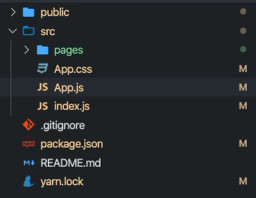
App.js
import React, { PureComponent } from 'react';

import { BrowserRouter, Route, Link } from 'react-router-dom';

import Home from './pages/home';
import About from './pages/about';
import Profile from './pages/profile';

export default class App extends PureComponent {
  render() {
    return (
      <div>
        <BrowserRouter>
          <Link to="/">首页</Link>
          <Link to="/about">关于</Link>
          <Link to="/profile">我的</Link>

          <Route exact path="/" component={Home} />
          <Route path="/about" component={About} />
          <Route path="/profile" component={Profile} />
        </BrowserRouter>
      </div>
    )
  }
}
2
3
4
5
6
7
8
9
10
11
12
13
14
15
16
17
18
19
20
21
22
23
24
25
<Route/> 放置位置会影响内容显示位置
处理流程:Link 路径 => Route 路径与组件 => BrowserRouter
# NavLink 的使用(为 Link 添加样式)
如果想路径选中时,对应的 a 元素变为红色,我们可以使用 NavLink 组件来替代 Link 组件:
- activeStyle:活跃时(匹配时)的样式;
- activeClassName:活跃时添加的class;
- exact:是否精准匹配;
activeStyle 方式
但是,我们会发现在选中 about 或 profile 时,第一个也会变成红色:
- 原因是 / 路径模糊匹配到了 /about 或 /profile;
- 这个时候,可以在第一个 NavLink 中添加上exact 属性;
<NavLink exact to="/" activeStyle={{color: "red"}}>首页</NavLink>
<NavLink to="/about" activeStyle={{color: "red"}}>关于</NavLink>
<NavLink to="/profile" activeStyle={{color: "red"}}>我的</NavLink>
2
3
activeClassName 方式:
- 事实上在默认匹配成功时,NavLink 就会添加上一个动态的 active class;
- 所以我们也可以直接编写样式
App.css
a.link-active {
  color: red;
}
2
3
App.js
<NavLink exact to="/" activeClassName="link-active">首页</NavLink>
<NavLink to="/about" activeClassName="link-active">关于</NavLink>
<NavLink to="/profile" activeClassName="link-active">我的</NavLink>
2
3
# Switch 的作用(只匹配一个组件)
<Route exact path="/" component={Home} />
<Route path="/about" component={About} />
<Route path="/profile" component={Profile} />
<Route path="/:userid" component={User}/>
<Route component={NoMatch}/>
2
3
4
5
上面的路由规则中:
- 当我们匹配到某一个路径时,我们会发现有一些问题;
- 比如 /about 路径匹配到的同时,
/:userid也被匹配到了,并且最后的一个 NoMatch 组件总是被匹配到;
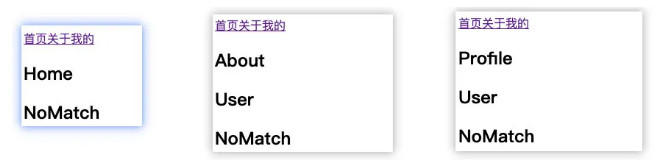
原因是默认情况下,react-router 中只要是路径被匹配到的 Route , 对应的组件都会被渲染;
但是实际开发中,我们希望有一种排它的思想:
- 只要匹配到了第一个,那么后面的就不应该继续匹配了;
- 这个时候,就可以使用 Switch 来将所有的 Route 进行包裹即可;
Switch 会按顺序匹配,只显示第一个路径匹配的组件,其它的都不显示
<Switch>
  <Route exact path="/" component={Home} />
  <Route path="/about" component={About} />
  <Route path="/profile" component={Profile} />
  <Route path="/:userid" component={User} />
  <Route component={NoMatch} />
</Switch>
2
3
4
5
6
7
效果:/about 只显示 About,不显示 /:userid 的 User 组件和 NoMatch 组件
# Redirect 的使用(自动重新跳转)
Redirect 用于路由的重定向,一旦这个组件出现,就会重新跳转到对应的 to 路径中:
思考一个场景案例:
- 用户跳转到 User 页面;
- 在 User 页面有一个 isLogin 用于记录用户是否登录:
- true:那么显示用户的名称;
- false:直接重定向到登录界面;
pages/user.js
import { Redirect } from 'react-router-dom';

export default class User extends PureComponent {
  constructor(props) {
    super(props);

    this.state = {
      isLogin: false
    }
  }

  render() {
    return this.state.isLogin ? (
      <div>
        <h2>User</h2>
        <h2>用户名: coderwhy</h2>
      </div>
    ): <Redirect to="/login"/>
  }
}
2
3
4
5
6
7
8
9
10
11
12
13
14
15
16
17
18
19
20
pages/login.js
import React, { PureComponent } from 'react'

export default class Login extends PureComponent {
  render() {
    return (
      <div>
        <h2>Login</h2>
      </div>
    )
  }
}
2
3
4
5
6
7
8
9
10
11
App.js
import React, { PureComponent } from 'react';

import {
  BrowserRouter,
  Link,
  Route,
  NavLink,
  Switch
} from 'react-router-dom';

import './App.css';

import Home from './pages/home';
import About from './pages/about';
import Profile from './pages/profile';
import User from './pages/user';
import Login from './pages/login';
import NoMatch from './pages/noMatch';

export default class App extends PureComponent {
  render() {
    return (
      <div>
        <BrowserRouter>
          <NavLink exact to="/" activeClassName="link-active">首页</NavLink>
          <NavLink to="/about" activeClassName="link-active">关于</NavLink>
          <NavLink to="/profile" activeClassName="link-active">我的</NavLink>
          <NavLink to="/user" activeClassName="link-active">用户</NavLink>

          <Switch>
            <Route exact path="/" component={Home} />
            <Route path="/about" component={About} />
            <Route path="/profile" component={Profile} />
            <Route path="/:id" component={User} />
            <Route path="/login" component={Login} />
            <Route component={NoMatch} />
          </Switch>
        </BrowserRouter>
      </div>
    )
  }
}
2
3
4
5
6
7
8
9
10
11
12
13
14
15
16
17
18
19
20
21
22
23
24
25
26
27
28
29
30
31
32
33
34
35
36
37
38
39
40
41
42
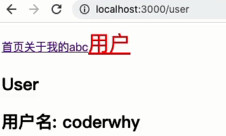
login 为 false
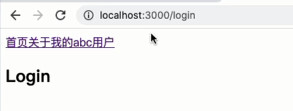
login 为 true
# 路由嵌套的基本使用(子路由)
在开发中,路由之间是存在嵌套关系的。
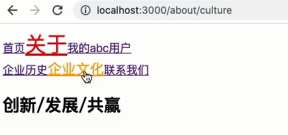
假设 about 页面中有三个子页面内容,点击不同的链接可以跳转到不同的地方,显示不同的内容:
pages/about.js
import React, { PureComponent } from 'react'
import { NavLink, Switch, Route } from 'react-router-dom';

function AboutHisotry(props) {
  return <h2>企业成立于2000年, 拥有悠久的历史文化</h2>
}

function AboutCulture(props) {
  return <h2>创新/发展/共赢</h2>
}

function AboutContact(props) {
  return <h2>联系电话: 020-68888888</h2>
}

export default class About extends PureComponent {
  render() {
    return (
      <div>
        <NavLink exact to="/about" activeClassName="about-active">企业历史</NavLink>
        <NavLink exact to="/about/culture" activeClassName="about-active">企业文化</NavLink>
        <NavLink exact to="/about/contact" activeClassName="about-active">联系我们</NavLink>
        <Switch>
          <Route exact path="/about" component={AboutHisotry}/>
          <Route path="/about/culture" component={AboutCulture}/>
          <Route path="/about/contact" component={AboutContact}/>
        </Switch>
      </div>
    )
  }
}
2
3
4
5
6
7
8
9
10
11
12
13
14
15
16
17
18
19
20
21
22
23
24
25
26
27
28
29
30
31
App.css
a.link-active {
  color: red;
}

a.about-active {
  color: orange;
  font-size: 20px;
}
2
3
4
5
6
7
8
App.js
import React, { PureComponent } from 'react';

import {
  BrowserRouter,
  Link,
  Route,
  NavLink,
  Switch
} from 'react-router-dom';

import './App.css';

import Home from './pages/home';
import About from './pages/about';
import Profile from './pages/profile';
import User from './pages/user';
import Login from './pages/login';
import NoMatch from './pages/noMatch';

export default class App extends PureComponent {
  render() {
    return (
      <div>
        <BrowserRouter>
          <NavLink exact to="/" activeClassName="link-active">首页</NavLink>
          <NavLink to="/about" activeClassName="link-active">关于</NavLink>
          <NavLink to="/profile" activeClassName="link-active">我的</NavLink>
          <NavLink to="/user" activeClassName="link-active">用户</NavLink>

          <Switch>
            <Route exact path="/" component={Home} />
            <Route path="/about" component={About} />
            <Route path="/profile" component={Profile} />
            <Route path="/:id" component={User} />
            <Route path="/login" component={Login} />
            <Route component={NoMatch} />
          </Switch>
        </BrowserRouter>
      </div>
    )
  }
}
2
3
4
5
6
7
8
9
10
11
12
13
14
15
16
17
18
19
20
21
22
23
24
25
26
27
28
29
30
31
32
33
34
35
36
37
38
39
40
41
42
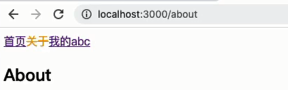
效果
# 手动路由跳转(非 Route 路由方式跳转)
通过JavaScript 代码进行跳转有一个前提:必须获取到 history 对象。
如何可以获取到 history 的对象呢?两种方式
- 方式一:如果该组件是通过路由直接跳转过来的,那么可以直接获取 history、location、match 对象;
- 方式二:如果该组件是一个普通渲染的组件,那么不可以直接获取 history、location、match 对象;
那么如果普通的组件也希望获取对应的对象属性应该怎么做呢?
- 前面我们学习过高阶组件,可以在组件中添加想要的属性;
- react-router 也是通过高阶组件为我们的组件添加相关的属性的;
例如,如果我们希望在 App 组件中获取到 history 对象,必须满足一下两个条件:
- App 组件必须包裹在 Router 组件之内;
- App 组件使用 withRouter 高阶组件包裹;
目录结构:
pages/about.js
import React, { PureComponent } from 'react'
import { NavLink, Switch, Route } from 'react-router-dom';

function AboutHisotry(props) {
  return <h2>企业成立于2000年, 拥有悠久的历史文化</h2>
}

function AboutCulture(props) {
  return <h2>创新/发展/共赢</h2>
}

function AboutContact(props) {
  return <h2>联系电话: 020-68888888</h2>
}

function AboutJoin(props) {
  return <h2>投递简历到aaaa@123.com</h2>
}

export default class About extends PureComponent {
  jumpToJoin() {
    this.props.history.push("/about/join");
  }

  render() {
    return (
      <div>
        <NavLink exact to="/about" activeClassName="about-active">企业历史</NavLink>
        <NavLink exact to="/about/culture" activeClassName="about-active">企业文化</NavLink>
        <NavLink exact to="/about/contact" activeClassName="about-active">联系我们</NavLink>
        <button onClick={e => this.jumpToJoin()}>加入我们</button>
        <Switch>
          <Route exact path="/about" component={AboutHisotry}/>
          <Route path="/about/culture" component={AboutCulture}/>
          <Route path="/about/contact" component={AboutContact}/>
          <Route path="/about/join" component={AboutJoin}/>
        </Switch>
      </div>
    )
  }
}
2
3
4
5
6
7
8
9
10
11
12
13
14
15
16
17
18
19
20
21
22
23
24
25
26
27
28
29
30
31
32
33
34
35
36
37
38
39
40
41
pages/product.js
import React, { PureComponent } from 'react'

export default class Product extends PureComponent {
  render() {
    return (
      <div>
        <ul>
          <li>商品列表1</li>
          <li>商品列表2</li>
          <li>商品列表3</li>
          <li>商品列表4</li>
          <li>商品列表5</li>
        </ul>
      </div>
    )
  }
}
2
3
4
5
6
7
8
9
10
11
12
13
14
15
16
17
App.js
import React, { PureComponent } from 'react';

import {
  BrowserRouter,
  Link,
  Route,
  NavLink,
  Switch,
  withRouter
} from 'react-router-dom';

import './App.css';

import Home from './pages/home';
import About from './pages/about';
import Profile from './pages/profile';
import User from './pages/user';
import Login from './pages/login';
import Product from './pages/product';
import NoMatch from './pages/noMatch';

class App extends PureComponent {
  jumpToProduct() {
    this.props.history.push("/product");
  }

  render() {
    return (
      <div>
        <NavLink exact to="/" activeClassName="link-active">首页</NavLink>
        <NavLink to="/about" activeClassName="link-active">关于</NavLink>
        <NavLink to="/profile" activeClassName="link-active">我的</NavLink>
        <NavLink to="/user" activeClassName="link-active">用户</NavLink>
        <button onClick={e => this.jumpToProduct()}>商品</button>

        <Switch>
          <Route exact path="/" component={Home} />
          <Route path="/about" component={About} />
          <Route path="/profile" component={Profile} />
          <Route path="/:id" component={User} />
          <Route path="/login" component={Login} />
          <Route path="/product" component={Product} />
          <Route component={NoMatch} />
        </Switch>
      </div>
    )
  }
}

export default withRouter(App);
2
3
4
5
6
7
8
9
10
11
12
13
14
15
16
17
18
19
20
21
22
23
24
25
26
27
28
29
30
31
32
33
34
35
36
37
38
39
40
41
42
43
44
45
46
47
48
49
50
index.js
import React from 'react';
import ReactDOM from 'react-dom';
import App from './App';
import { BrowserRouter } from 'react-router-dom';

ReactDOM.render(
  <BrowserRouter>
    <App/>
  </BrowserRouter>,
  document.getElementById('root')
);
2
3
4
5
6
7
8
9
10
11
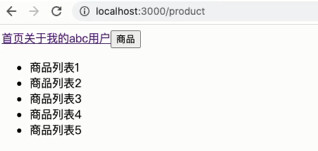
点击加入我们与商品,大概的效果如图:

# 动态路由(路由传参)
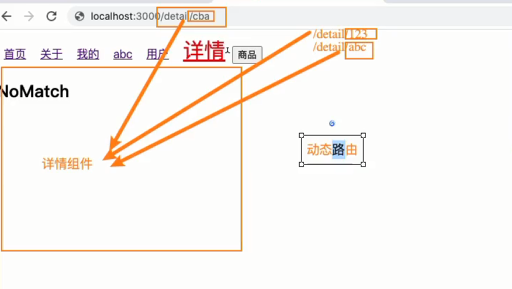
# 传递简单的参数
pages/detail.js
import React, { PureComponent } from 'react'

export default class Detail extends PureComponent {
  render() {
    const match = this.props.match;
    console.log(match.params);

    return (
      <div>
        <h2>Detail: {match.params.id}</h2>
      </div>
    )
  }
}
2
3
4
5
6
7
8
9
10
11
12
13
14
App.css
a {
  margin: 0 10px;
}

a.active, a.link-active {
  color: red;
  font-size: 30px;
}

a.about-active {
  color: orange;
  font-size: 20px;
}
2
3
4
5
6
7
8
9
10
11
12
13
App.js
import React, { PureComponent } from 'react';

import {
  BrowserRouter,
  Link,
  Route,
  NavLink,
  Switch,
  withRouter
} from 'react-router-dom';

import './App.css';

import Home from './pages/home';
import About from './pages/about';
import Profile from './pages/profile';
import User from './pages/user';
import Login from './pages/login';
import Product from './pages/product';
import Detail from './pages/detail';
import NoMatch from './pages/noMatch';

class App extends PureComponent {
  jumpToProduct() {
    this.props.history.push("/product");
  }

  render() {
    const id = "123";
    return (
      <div>
        <NavLink exact to="/" activeClassName="link-active">首页</NavLink>
        <NavLink to="/about" activeClassName="link-active">关于</NavLink>
        <NavLink to="/profile" activeClassName="link-active">我的</NavLink>
        <NavLink to="/user" activeClassName="link-active">用户</NavLink>
        <NavLink to={`/detail/${id}`} activeClassName="link-active">详情</NavLink>
        <button onClick={e => this.jumpToProduct()}>商品</button>

        <Switch>
          <Route exact path="/" component={Home} />
          <Route path="/about" component={About} />
          <Route path="/profile" component={Profile} />
          <Route path="/:id" component={User} />
          <Route path="/login" component={Login} />
          <Route path="/detail/:id" component={Detail} />
          <Route path="/product" component={Product} />
          <Route component={NoMatch} />
        </Switch>
      </div>
    )
  }
}

export default withRouter(App);
2
3
4
5
6
7
8
9
10
11
12
13
14
15
16
17
18
19
20
21
22
23
24
25
26
27
28
29
30
31
32
33
34
35
36
37
38
39
40
41
42
43
44
45
46
47
48
49
50
51
52
53
54
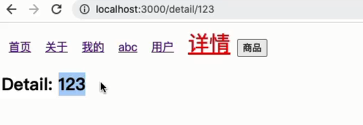
效果图
# search 传递参数(不推荐)
pages/detail2.js
import React, { PureComponent } from 'react'

export default class Detail2 extends PureComponent {
  render() {
    console.log(this.props.location.search); // ?name=why&age=18

    return (
      <div>
        <h2>Detail2:{this.props.location.search}</h2>
      </div>
    )
  }
}
2
3
4
5
6
7
8
9
10
11
12
13
App.js
import React, { PureComponent } from 'react';

import {
  BrowserRouter,
  Link,
  Route,
  NavLink,
  Switch,
  withRouter
} from 'react-router-dom';

import './App.css';

import Home from './pages/home';
import About from './pages/about';
import Profile from './pages/profile';
import User from './pages/user';
import Login from './pages/login';
import Product from './pages/product';
import Detail from './pages/detail';
import Detail2 from './pages/detail2';
import NoMatch from './pages/noMatch';

class App extends PureComponent {
  jumpToProduct() {
    this.props.history.push("/product");
  }

  render() {
    const id = "123";

    return (
      <div>
        <NavLink exact to="/" activeClassName="link-active">首页</NavLink>
        <NavLink to="/about" activeClassName="link-active">关于</NavLink>
        <NavLink to="/profile" activeClassName="link-active">我的</NavLink>
        <NavLink to="/user" activeClassName="link-active">用户</NavLink>
        <NavLink to={`/detail/${id}`} activeClassName="link-active">详情</NavLink>
        <NavLink to="/detail2?name=why&age=18">详情2</NavLink>
        <button onClick={e => this.jumpToProduct()}>商品</button>

        <Switch>
          <Route exact path="/" component={Home} />
          <Route path="/about" component={About} />
          <Route path="/profile" component={Profile} />
          <Route path="/:id" component={User} />
          <Route path="/login" component={Login} />
          <Route path="/detail/:id" component={Detail} />
          <Route path="/detail2" component={Detail2} />
          <Route path="/product" component={Product} />
          <Route component={NoMatch} />
        </Switch>
      </div>
    )
  }
}

export default withRouter(App);
2
3
4
5
6
7
8
9
10
11
12
13
14
15
16
17
18
19
20
21
22
23
24
25
26
27
28
29
30
31
32
33
34
35
36
37
38
39
40
41
42
43
44
45
46
47
48
49
50
51
52
53
54
55
56
57
58
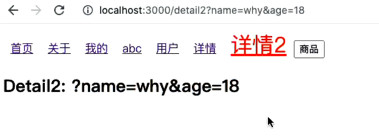
效果图
# to 传递对象
pages/detail3.js
import React, { PureComponent } from 'react'

export default class Detail3 extends PureComponent {
  render() {
    const location = this.props.location.search; // ?name=why&age=18

    return (
      <div>
        <h2>Detail3:{location.state.name}</h2>
      </div>
    )
  }
}
2
3
4
5
6
7
8
9
10
11
12
13
App.js
import React, { PureComponent } from 'react';

import {
  BrowserRouter,
  Link,
  Route,
  NavLink,
  Switch,
  withRouter
} from 'react-router-dom';

import './App.css';

import Home from './pages/home';
import About from './pages/about';
import Profile from './pages/profile';
import User from './pages/user';
import Login from './pages/login';
import Product from './pages/product';
import Detail from './pages/detail';
import Detail2 from './pages/detail2';
import Detail3 from './pages/detail3';
import NoMatch from './pages/noMatch';

class App extends PureComponent {
  jumpToProduct() {
    this.props.history.push("/product");
  }

  render() {
    const id = "123";
    const info = {name: "why", age: 18, height: 1.88};

    return (
      <div>
        <NavLink exact to="/" activeClassName="link-active">首页</NavLink>
        <NavLink to="/about" activeClassName="link-active">关于</NavLink>
        <NavLink to="/profile" activeClassName="link-active">我的</NavLink>
        <NavLink to="/user" activeClassName="link-active">用户</NavLink>
        <NavLink to={`/detail/${id}`} activeClassName="link-active">详情</NavLink>
        <NavLink to="/detail2?name=why&age=18">详情2</NavLink>
        <NavLink to={{
          pathname: "/detail2",
          state: info,
          search: "?name=abc"
        }}>
        详情3
       </NavLink>
        <button onClick={e => this.jumpToProduct()}>商品</button>

        <Switch>
          <Route exact path="/" component={Home} />
          <Route path="/about" component={About} />
          <Route path="/profile" component={Profile} />
          <Route path="/:id" component={User} />
          <Route path="/login" component={Login} />
          <Route path="/detail/:id" component={Detail} />
          <Route path="/detail2" component={Detail2} />
           <Route path="/detail3" component={Detail3} />
          <Route path="/product" component={Product} />
          <Route component={NoMatch} />
        </Switch>
      </div>
    )
  }
}

export default withRouter(App);
2
3
4
5
6
7
8
9
10
11
12
13
14
15
16
17
18
19
20
21
22
23
24
25
26
27
28
29
30
31
32
33
34
35
36
37
38
39
40
41
42
43
44
45
46
47
48
49
50
51
52
53
54
55
56
57
58
59
60
61
62
63
64
65
66
67
68
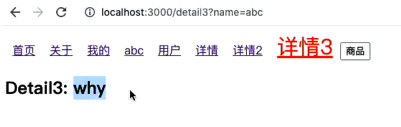
效果图
# react-router-config(统一管理路由)
目前所有的路由定义都是直接使用 Route 组件,并且添加属性来完成的。
但是这样的方式会让路由变得非常混乱,所以我们希望将所有的路由配置放到一个地方进行集中管理:
yarn add react-router-config
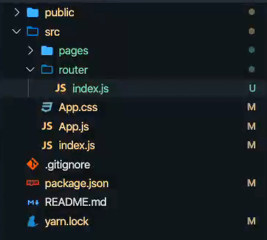
目录结构
pages/about.js
import React, { PureComponent } from 'react'
import { NavLink, Switch, Route } from 'react-router-dom';
import { renderRoutes, matchRoutes } from 'react-router-config';

export function AboutHisotry(props) {
  return <h2>企业成立于2000年, 拥有悠久的历史文化</h2>
}

export function AboutCulture(props) {
  return <h2>创新/发展/共赢</h2>
}

export function AboutContact(props) {
  return <h2>联系电话: 020-68888888</h2>
}

export function AboutJoin(props) {
  return <h2>投递简历到aaaa@123.com</h2>
}

export default class About extends PureComponent {
  render() {
    // App.js renderRoutes(routes) 添加给 About 的 route
    console.log(this.props.route);
    // const branch = matchRoutes(this.props.route.routes, "/about");
    // console.log(branch);

    return (
      <div>
        <NavLink exact to="/about" activeClassName="about-active">企业历史</NavLink>
        <NavLink exact to="/about/culture" activeClassName="about-active">企业文化</NavLink>
        <NavLink exact to="/about/contact" activeClassName="about-active">联系我们</NavLink>
        <button onClick={e => this.jumpToJoin()}>加入我们</button>

        {/* <Switch>
          <Route exact path="/about" component={AboutHisotry}/>
          <Route path="/about/culture" component={AboutCulture}/>
          <Route path="/about/contact" component={AboutContact}/>
          <Route path="/about/join" component={AboutJoin}/>
        </Switch> */}

        {renderRoutes(this.props.route.routes)}
      </div>
    )
  }

  jumpToJoin() {
    // console.log(this.props.history);
    // console.log(this.props.location);
    // console.log(this.props.match);
    this.props.history.push("/about/join");
  }
}
2
3
4
5
6
7
8
9
10
11
12
13
14
15
16
17
18
19
20
21
22
23
24
25
26
27
28
29
30
31
32
33
34
35
36
37
38
39
40
41
42
43
44
45
46
47
48
49
50
51
52
53
About 的 this.props.route
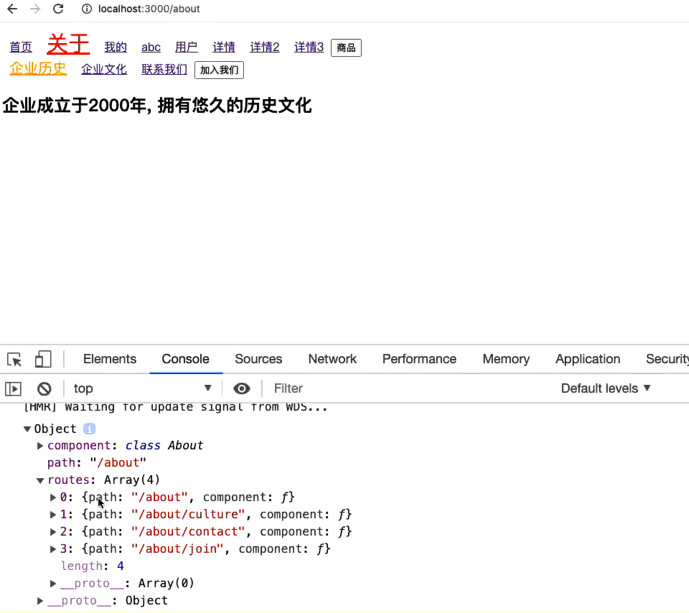
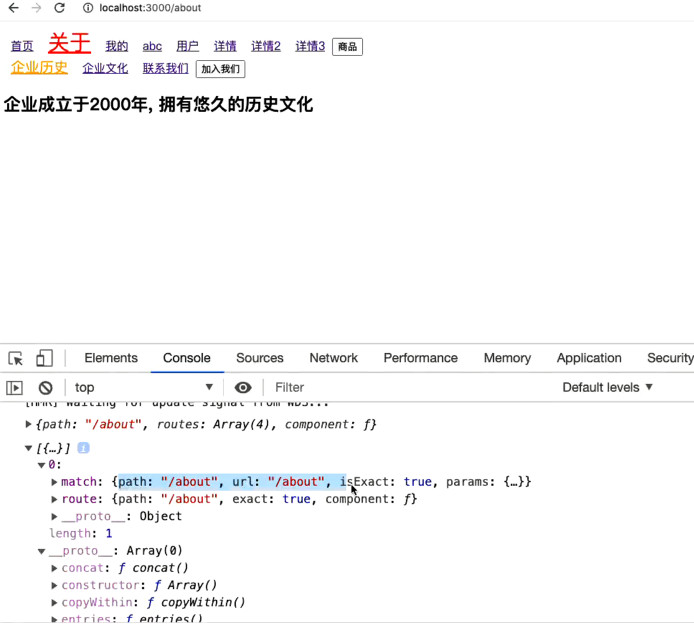
react-router-config 中还提供了一个matchRoutes辅助函数:
matchRoutes(routes, pathname)传入一个路由对象数组,获取所有匹配的路径;
const branch = matchRoutes(this.props.route.routes, "/about");
console.log(branch);
2
router/index.js
import Home from './pages/home';
import About, {AboutHisotry, AboutCulture, AboutContact, AboutJoin} from './pages/about';
import Profile from './pages/profile';
import User from './pages/user';
import Login from './pages/login';
import Product from './pages/product';
import Detail from './pages/detail';
import Detail2 from './pages/detail2';
import Detail3 from './pages/detail3';
import NoMatch from './pages/noMatch';

const routes = [
  {
    path: "/",
    exact: true,
    component: Home
  },
  {
    path: "/about",
    component: About,
    routes: [
      {
        path: "/about",
        exact: true,
        component: AboutHisotry
      },
      {
        path: "/about/culture",
        component: AboutMessage
      },
      {
        path: "/about/contact",
        component: AboutContact
      },
      {
        path: "/about/join",
        component: AboutJoin
      }
    ]
  },
  {
    path: "/profile",
    component: Profile
  },
  {
    path: "/login",
    component: Login
  },
  {
    path: "/user",
    component: User
  },
  {
    path: "/detail/:id",
    component: Detail
  },
  {
    path: "/detail2",
    component: Detail2
  },
  {
    path: "/detail3",
    component: Detail3
  },
  {
    component: NoMatch
  }
];

export default routes;
2
3
4
5
6
7
8
9
10
11
12
13
14
15
16
17
18
19
20
21
22
23
24
25
26
27
28
29
30
31
32
33
34
35
36
37
38
39
40
41
42
43
44
45
46
47
48
49
50
51
52
53
54
55
56
57
58
59
60
61
62
63
64
65
66
67
68
69
70
App.js
import React, { PureComponent } from 'react';

import {
  BrowserRouter,
  Link,
  Route,
  NavLink,
  Switch,
  withRouter
} from 'react-router-dom';

import './App.css';

import Home from './pages/home';
import About from './pages/about';
import Profile from './pages/profile';
import User from './pages/user';
import Login from './pages/login';
import Product from './pages/product';
import Detail from './pages/detail';
import Detail2 from './pages/detail2';
import Detail3 from './pages/detail3';
import NoMatch from './pages/noMatch';

import { renderRoutes } from 'react-router-config';
import routes from './router';

class App extends PureComponent {
  jumpToProduct() {
    this.props.history.push("/product");
  }

  render() {
    const id = "123";
    const info = {name: "why", age: 18, height: 1.88};

    return (
      <div>
        <NavLink exact to="/" activeClassName="link-active">首页</NavLink>
        <NavLink to="/about" activeClassName="link-active">关于</NavLink>
        <NavLink to="/profile" activeClassName="link-active">我的</NavLink>
        <NavLink to="/user" activeClassName="link-active">用户</NavLink>
        <NavLink to={`/detail/${id}`} activeClassName="link-active">详情</NavLink>
        <NavLink to="/detail2?name=why&age=18">详情2</NavLink>
        <NavLink to={{
          pathname: "/detail2",
          state: info,
          search: "?name=abc"
        }}>
        详情3
       </NavLink>
        <button onClick={e => this.jumpToProduct()}>商品</button>

        {renderRoutes(routes)}
      </div>
    )
  }
}

export default withRouter(App);
2
3
4
5
6
7
8
9
10
11
12
13
14
15
16
17
18
19
20
21
22
23
24
25
26
27
28
29
30
31
32
33
34
35
36
37
38
39
40
41
42
43
44
45
46
47
48
49
50
51
52
53
54
55
56
57
58
59
60
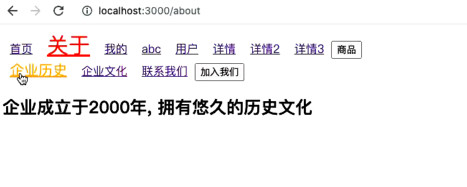
效果图
# 实际应用
src\router\index.js
import React from 'react';
import { Redirect } from "react-router-dom";

import Discover from "@/pages/discover";
import Recommend from "../pages/discover/child-pages/recommend";
import Ranking from "../pages/discover/child-pages/ranking";
import Songs from "../pages/discover/child-pages/songs";
import Djradio from "../pages/discover/child-pages/djradio";
import Artist from "../pages/discover/child-pages/artist";
import Album from "../pages/discover/child-pages/album";
import Player from "../pages/player";

import Mine from "@/pages/mine";
import Friend from "@/pages/friend";

const routes = [
  {
    path: "/",
    exact: true,
    render: () => (
      <Redirect to="/discover"/>
    )
  },
  {
    path: "/discover",
    component: Discover,
    routes: [
      {
        path: "/discover",
        exact: true,
        render: () => (
          <Redirect to="/discover/recommend"/>
        )
      },
      {
        path: "/discover/recommend",
        component: Recommend
      },
      {
        path: "/discover/ranking",
        component: Ranking
      },
      {
        path: "/discover/songs",
        component: Songs
      },
      {
        path: "/discover/djradio",
        exact: true,
        component: Djradio
      },
      {
        path: "/discover/artist",
        component: Artist
      },
      {
        path: "/discover/album",
        component: Album
      },
      {
        path: "/discover/player",
        component: Player
      }
    ]
  },
  {
    path: "/mine",
    component: Mine
  },
  {
    path: "/friend",
    component: Friend
  },
];

export default routes;
2
3
4
5
6
7
8
9
10
11
12
13
14
15
16
17
18
19
20
21
22
23
24
25
26
27
28
29
30
31
32
33
34
35
36
37
38
39
40
41
42
43
44
45
46
47
48
49
50
51
52
53
54
55
56
57
58
59
60
61
62
63
64
65
66
67
68
69
70
71
72
73
74
75
76
src\App.js
import React, { memo } from 'react';
import { Provider } from "react-redux";
import { renderRoutes } from 'react-router-config';

import routes from './router';
import store from "./store";

import AppHeader from "components/app-header";
import AppFooter from "components/app-footer";
import AppPlayerBar from './pages/player/app-player-bar';
import { HashRouter } from 'react-router-dom';

export default memo(function App() {
  return (
    // 使用 Provider,让包裹的组件使用 connect 来获取 store 的数据
    <Provider store={store}>
      <HashRouter>
        <AppHeader/>
        {renderRoutes(routes)}
        <AppFooter/>
        <AppPlayerBar/>
      </HashRouter>
    </Provider>
  )
})
2
3
4
5
6
7
8
9
10
11
12
13
14
15
16
17
18
19
20
21
22
23
24
25
src\components\app-header\index.js
import React, { memo } from 'react';

import { headerLinks } from "@/common/local-data";

import { NavLink } from 'react-router-dom';
import { SearchOutlined } from '@ant-design/icons'
import { Input } from "antd";
import {
  HeaderWrapper,
  HeaderLeft,
  HeaderRight
} from './style';

export default memo(function AppHeader() {

  // 页面代码
  const showSelectItem = (item, index) => {
    if (index < 3) {
      return (
        <NavLink to={item.link}>
          {item.title}
          <i className="sprite_01 icon"></i>
        </NavLink>
      )
    } else {
      return <a href={item.link}>{item.title}</a>
    }
  }

  // 返回的jsx
  return (
    <HeaderWrapper>
      <div className="content wrap-v1">
        <HeaderLeft>
          <a href="#/" className="logo sprite_01">网易云音乐</a>
          <div className="select-list">
            {
              headerLinks.map((item, index) => {
                return (
                  <div key={item.title} className="select-item">
                    {showSelectItem(item, index)}
                  </div>
                )
              })
            }
          </div>
        </HeaderLeft>
        <HeaderRight>
          <Input className="search" placeholder="音乐/视频/电台/用户" prefix={<SearchOutlined/>}/>
          <div className="center">创作者中心</div>
          <div>登录</div>
        </HeaderRight>
      </div>
      <div className="divider"></div>
    </HeaderWrapper>
  )
})
2
3
4
5
6
7
8
9
10
11
12
13
14
15
16
17
18
19
20
21
22
23
24
25
26
27
28
29
30
31
32
33
34
35
36
37
38
39
40
41
42
43
44
45
46
47
48
49
50
51
52
53
54
55
56
57
二级路由
src\pages\discover\index.js
import React, { memo } from 'react';
import { renderRoutes } from 'react-router-config';

import { dicoverMenu } from "@/common/local-data";

import { NavLink } from 'react-router-dom';
import {
  DiscoverWrapper,
  TopMenu
} from './style';

export default memo(function Discover(props) {
  const { route } = props;

  return (
    <DiscoverWrapper>
      <div className="top">
        <TopMenu className="wrap-v1">
          {
            dicoverMenu.map((item, index) => {
              return (
                <div className="item" key={item.title}>
                  <NavLink to={item.link}>{item.title}</NavLink>
                </div>
              )
            })
          }
        </TopMenu>
      </div>
      {renderRoutes(route.routes)}
    </DiscoverWrapper>
  )
})
2
3
4
5
6
7
8
9
10
11
12
13
14
15
16
17
18
19
20
21
22
23
24
25
26
27
28
29
30
31
32
33